Elgato Video Capture Review
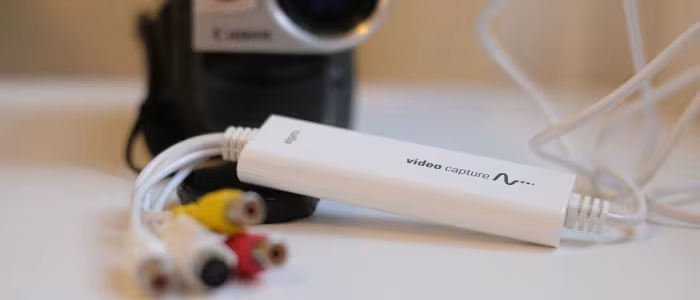
Elgato Capture Series (Video Capture, Cam Link 4K, Game Capture Neo)
A range of plug-and-play digitizing and capture solutions from Elgato for home archiving, streaming, and gaming.
How This Score Is Calculated
- Sources analysed: 6 reviews
- Sentiment-only: 6 sources (weighted 1.0×)
- Split: 4 Positive · 2 Mixed
- Raw weighted average: 7.4
- Final score: 7.4/10
- Most reviewed featureEase of Use (6/6)
- Most praisedPlug-and-play simplicity
- Most criticisedPricing vs. budget rivals
- Reviewer consensus levelHigh
Elgato’s capture range is widely praised for turning complex analog-to-digital or capture tasks into user-friendly, plug-and-play experiences. While the devices are exceptionally reliable and simplify workflows for non-technical users, they often command a premium price compared to budget-focused competitors. Whether archiving old VHS tapes or streaming 4K gameplay, Elgato provides a consistent, albeit sometimes over-simplified, experience that excels for most casual and professional users.
🔧 Key Specifications
Specifications sourced from reviewer mentions. Verify with manufacturer for complete details.
- Resolution: Up to 4K60fps (Cam Link/Neo)
- Connectivity: USB 2.0 (Video Capture) / USB 3.0 (Cam Link 4K)
- Latency: Low-latency / Lag-free passthrough
- Compatibility: Mac, PC, Consoles, Cameras, VCRs
- Software: Proprietary Elgato software, OBS Studio compatible
💲 Price Range
Approximately ₹7,100 – ₹10,000 ($98.21 – $98.91)
📊 What Reviewers Say — Feature by Feature
3 features evaluated across 6 sources.
👍 Key Strengths
- Extremely user-friendly plug-and-play setup
- Highly reliable performance for archiving
- Lag-free 4K passthrough capabilities
- Excellent software integration and guidance
- Safe, at-home digitizing process
👎 Key Weaknesses
- Premium price compared to budget rivals
- Requires real-time recording for tapes
- Complex HDCP/software setup nuances
- Requires high-bandwidth USB 3.0
💰 Value for Money Analysis
Reviewers generally consider Elgato products a fair, one-time investment for their reliability. While they are pricier than budget alternatives, they avoid the recurring costs of professional mail-in digitization services.
4 of 6 sources commented on price or value.
⚡ Where Reviewers Disagreed
The following areas saw meaningful disagreement across sources.
- Setup Complexity: 2 sources praised the 'plug-and-play' nature as definitive, while 1 source noted that initial HDCP and software configurations can be a hurdle for some users.
🎯 Who This Product Is For
Reviewer recommendations for different target audiences and use cases.
🛠️ Best Use Cases
- Digitizing VHS Tapes Ideal for home users keeping tapes at home instead of using mail-in services. Great
- Live Streaming Excellent integration with OBS and low-latency performance for cameras and consoles. Great
- Video Conferencing Provides a high-quality input signal for professional looking calls. Good
🔀 Alternatives Mentioned by Reviewers
Reviewers identified several alternatives based on budget, platform, and specific use-case requirements.
- DigitNow / VIDBOX — Cited as cheaper, budget-friendly alternatives to Elgato. Reviewers note these are more cost-effective but may lack the reliability and software polish of Elgato products.
- EyeTV 250 — Recommended specifically for users with older G4 or G5 Macs; it handles video encoding internally, which is beneficial for older hardware compared to the Elgato Video Capture.
- Terratec / Hauppauge — Mentioned as rival TV tuners with video input capabilities that may be more competitive for PC users or those seeking specific tuners.
- iMemories — A professional mail-in service for digitizing tapes; reviewers note it is more expensive and requires sending tapes away, whereas Elgato allows keeping tapes at home.
Alternatives sourced exclusively from reviewer mentions.
🛒 Buyer's Guide
✅ Buy This If…
- You want a simple, reliable solution for digitizing tapes at home.
- You are a streamer needing professional-grade, low-latency capture.
- You prefer a plug-and-play experience over manual configuration.
❌ Skip This If…
- You are on a very strict budget and prefer cheaper, no-frills hardware.
- You are using an older G4/G5 Mac that struggles with modern real-time encoding.
- You need a device that doesn't require a functional VCR for digitizing.
⚠️ Things to Check Before Buying
- Ensure your computer has the appropriate port (USB 3.0 vs 2.0) for your specific Elgato model.
- Check that your VCR is fully functional, as the device requires live playback to capture.
- Verify your Mac or PC processor meets the minimum encoding requirements.
The Elgato capture range is a dependable, high-quality choice that prioritizes ease of use. While it carries a premium price tag compared to budget alternatives, the reliability and software guidance it offers provide excellent value for those looking to avoid professional services or complex technical hurdles. For most home users and streamers, it is a solid, stress-free investment.
PLG_CONTENT_IMAGEGALLERY_ERROR_NO_IMAGES