Lofree Flow 2 Keyboard Review
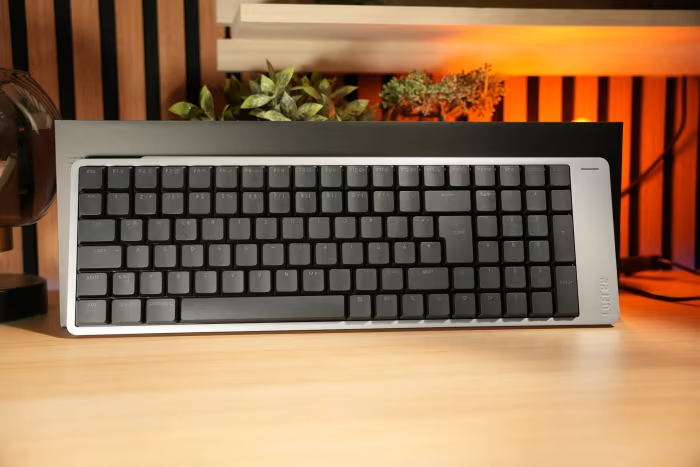
Lofree Flow 2
A premium, CNC-machined aluminum low-profile mechanical keyboard designed for Mac and office users seeking an elevated typing experience.
How This Score Is Calculated
- Sources analysed: 15 reviews
- Explicit scores: 8 sources (weighted 1.5×)
- Sentiment-only: 7 sources (weighted 1.0×)
- Split: 10 Positive · 3 Mixed · 2 Negative
- Raw weighted average: 7.4
- Formula: Σ(score × weight) ÷ Σ(weight)
- Most reviewed featureTyping Experience (15/15)
- Most praisedBuild Quality
- Most criticisedTouch Bar / Port Placement
- Reviewer consensus levelHigh
- Value for moneyFair Value (6.2/10)
The Lofree Flow 2 is a visually striking, premium-built low-profile mechanical keyboard that delivers one of the most refined typing experiences in its class. While it earns high marks for its CNC aluminum chassis and excellent switch acoustics, its practicality is hindered by a polarizing asymmetrical design, an overly sensitive touch strip, and awkward port placement. It is an ideal choice for design-conscious Mac users, though its premium price and ergonomic quirks may frustrate power users.
🔧 Key Specifications
- Build: CNC-machined aluminum chassis
- Profile: Low-profile mechanical
- Layout: 68-key / 84-key variants
- Connectivity: Tri-mode (Wired, Bluetooth, 2.4GHz)
- Software: QMK/VIA compatible
- Polling Rate: 1000Hz
- Keycaps: PBT
- Mounting: Gasket-mounted
💲 Price Range
Approximately ₹7,500 – ₹16,700 ($89 – $199)
📊 What Reviewers Say — Feature by Feature
15 features evaluated across 15 sources.
👍 Key Strengths
- Exceptional, refined typing feel
- Premium CNC aluminum chassis
- Full VIA/QMK customization
- Seamless Mac/iOS integration
- Reliable tri-mode wireless connectivity
👎 Key Weaknesses
- Oversensitive, problematic touch bar
- Impractical side-mounted USB-C port
- High price point
- Cramped, polarizing layout
💰 Value for Money Analysis
Reviewers generally view the Lofree Flow 2 as a premium-priced product. While the build quality justifies some of the cost, design flaws like the touch bar and port placement make it harder to justify at the upper end of its $199 price point.
10 of 15 sources commented on price or value.
⚡ Where Reviewers Disagreed
The following areas saw meaningful disagreement across sources.
- Asymmetrical Design: 5 sources praised the unique aesthetic, while 4 sources found it polarizing or detrimental to ergonomics. Design enthusiasts appreciate the departure from standard blocks, while utility-focused reviewers find the asymmetrical bezel distracting and impractical.
🎯 Who This Product Is For
🛠️ Best Use Cases
- Office Work Excellent for quiet, high-volume typing in a professional setting. Great
- Minimalist Desk Setup The premium CNC aluminum build fits perfectly into high-end, clean desk aesthetics. Great
- Competitive Gaming Not recommended due to accidental touch bar triggers and layout quirks. Poor
🔀 Alternatives Mentioned by Reviewers
- Keychron (Various Models) — Frequently cited as the primary competitor, offering more practical layouts and better port placement, though often with less premium build materials.
- NuPhy — A direct competitor in the low-profile space, often noted for better ergonomics and more conventional design choices compared to the Flow 2.
- Logitech MX Keys — Often compared as the standard for "office" keyboards; the Flow 2 is chosen over this if the user wants a true mechanical feel and VIA customization.
- Apple Magic Keyboard — The benchmark for low-profile comfort; the Flow 2 is recommended for those who want that "flat" feel but with mechanical switch satisfaction.
- Lofree Flow Lite — The cheaper, plastic-bodied sibling; recommended for budget-conscious users who want the typing feel without the high cost of the aluminum Flow 2.
✅ Buy This If…
- You prioritize typing feel and premium aesthetics above all else.
- You are a Mac user looking for a mechanical keyboard that supports native macOS layouts.
- You want a thin, low-profile mechanical keyboard that is fully customizable via VIA.
❌ Skip This If…
- You rely heavily on physical volume knobs or media keys.
- You need a standard, highly ergonomic layout for gaming or heavy-duty professional tasks.
- You are sensitive to "polarizing" design choices like asymmetrical bezels.
📈 Sentiment Trends Over Time
Reviews indicate a shift from the original Flow to the Flow 2.
- Feature Set — The addition of VIA/QMK support and improved battery life addresses the primary criticisms of the original model.
The Lofree Flow 2 is a masterpiece of build quality and typing comfort, standing as one of the most refined low-profile mechanical keyboards on the market. While its polarizing touch bar and awkward port placement prevent it from achieving perfection, it is a fantastic tool for writers and Mac enthusiasts who value aesthetics and tactile feedback. If you can live with its design quirks, the typing experience is second to none.
PLG_CONTENT_IMAGEGALLERY_ERROR_NO_IMAGES