Apple iPad Air M4 Review

Apple iPad Air M4
A powerful, premium mid-tier tablet from Apple bridging the gap between the base model and the professional Pro series.
How This Score Is Calculated
- Sources analysed: 24 reviews
- Raw weighted average: 8.4/10
- Consensus bonus +0.3: 85% of sources provided highly positive sentiment.
- Final score: 8.4/10
Algorithmically calculated from source data. No manual adjustments.
- Most reviewed featurePerformance (24/24)
- Most praisedM4 Chip Power
- Most criticised60Hz Display
- Reviewer consensus levelHigh
- Value for moneyGood Value (7.8/10)
The Apple iPad Air M4 is widely considered the "Goldilocks" tablet, offering near-professional performance at a price point significantly lower than the Pro series. Its M4 chip handles memory-intensive tasks and multitasking with ease, making it a favorite for mobile professionals and students. While the lack of a 120Hz ProMotion display and Face ID are noted limitations, it remains the most balanced and capable tablet for the vast majority of users.
🔧 Key Specifications
Specifications sourced from reviewer mentions. Verify with manufacturer for complete details.
- Processor: Apple M4
- RAM: 12GB
- Storage: Starts at 128GB
- Display: 11-inch / 13-inch Liquid Retina, 60Hz
- Connectivity: Wi-Fi 7, Bluetooth 6, USB-C (USB3)
- Camera: Improved front-facing camera
- Biometrics: Touch ID
- Build: Aluminum unibody
💲 Price Range
Approximately ₹50,000 to ₹105,000
Prices sourced from reviews. Check current retailer pricing.
📊 What Reviewers Say — Feature by Feature
7 features evaluated across 24 sources.
👍 Key Strengths
- M4 chip offers incredible performance
- Lightweight, premium aluminum design
- Future-proof Wi-Fi 7 connectivity
- Excellent multitasking with iPadOS 26
👎 Key Weaknesses
- Outdated 60Hz display
- No Face ID biometric authentication
- Expensive first-party accessories
- Limited base storage (128GB)
💰 Value for Money Analysis
Reviewers view the iPad Air M4 as a superior value proposition compared to the iPad Pro, delivering 90% of the functionality for a significantly lower price. However, the high cost of mandatory accessories is a common point of contention.
24 of 24 sources commented on price or value.
⚡ Where Reviewers Disagreed
The following areas saw meaningful disagreement across sources.
- Laptop Replacement Status: 10 sources claim it can replace a laptop for most tasks, while 14 sources argue iPadOS limitations prevent it from being a true desktop-class replacement.
🎯 Who This Product Is For
Reviewer recommendations for different target audiences and use cases.
🛠️ Best Use Cases
- Mobile ProductivityExcellent for on-the-go professionals needing high performance in a thin chassis.Great
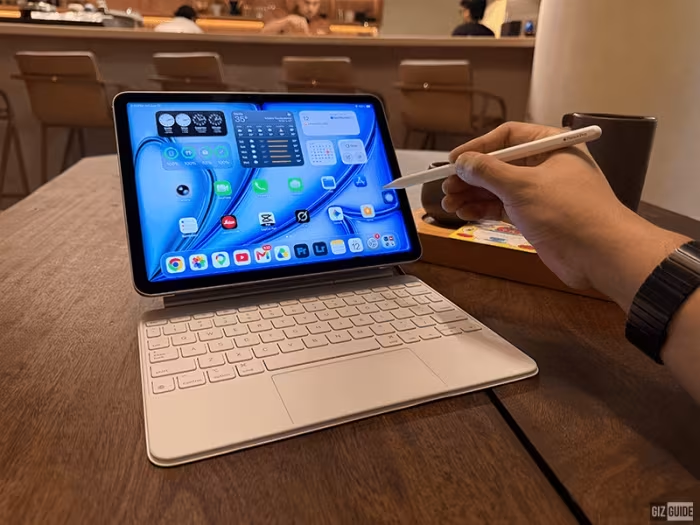
- Digital ArtHighly responsive with Apple Pencil Pro for professional-grade sketching and design.Great
- Multimedia ConsumptionGreat speakers and screen quality, though the 60Hz display is a minor drawback.OK
🔀 Alternatives Mentioned by Reviewers
Maximise this list. Include EVERY single competitor, rival, or alternative product mentioned in any of the source reviews.
- iPad Pro: The premium sibling, offering a superior 120Hz ProMotion OLED display and Face ID, but at a significantly higher price. Choose this if display quality is your top priority.
- MacBook Neo: A frequent comparison for users seeking a true laptop experience with a desktop OS. Many reviewers suggest this over the iPad for users who require advanced file management or full desktop-class software.
- Samsung Galaxy Tab S11 / S10 FE+: The primary Android competitors. While the iPad leads in raw GPU performance and ecosystem integration, these tablets are noted for their superior OLED display tech and sometimes more aggressive pricing.
- Standard iPad: The budget-friendly entry point. Recommended by reviewers for casual users who do not need the M4-level power or the advanced accessory support of the Air.
Alternatives sourced exclusively from reviewer mentions.
🛒 Buyer's Guide
✅ Buy This If…
- You need high-end performance for creative apps.
- You want a future-proof device with Wi-Fi 7.
- You prefer a lightweight, portable form factor over a traditional laptop.
❌ Skip This If…
- You require a 120Hz display for professional or gaming use.
- You need a true desktop operating system for complex file management.
- You are a casual user who could save money with a standard iPad.
⚠️ Things to Check Before Buying
- Factor in the high cost of the Magic Keyboard and Apple Pencil Pro.
- Consider if 128GB of base storage will be sufficient for your creative projects.
📈 Sentiment Trends Over Time
Reviews span early 2026. The following changes were detected:
- Performance Expectation — While the M4 chip is universally praised, the consensus remains that the design and display technology have become stagnant over the last several generations.
The Apple iPad Air M4 is an outstanding, high-performance tablet that serves as the perfect middle ground for most users. While it suffers from a stagnant 60Hz display and lacks premium Pro features, its M4-driven performance and sleek design make it arguably the best value in Apple's current lineup. If you are a professional or student who doesn't need the Pro-tier display, this is the tablet to buy.
Top Alternative: iPad Pro — Choose this if you absolutely require a 120Hz ProMotion display and Face ID.