Asus Zenbook Duo UX8407 Review
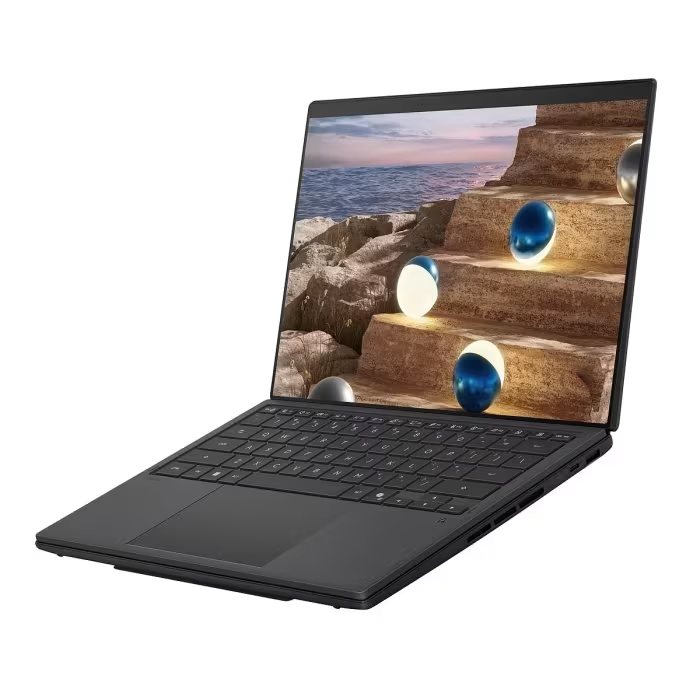
Asus Zenbook Duo UX8407
A premium, dual-screen productivity laptop featuring Intel Panther Lake architecture and dual 14-inch OLED displays for multitasking professionals.
How This Score Is Calculated
- Sources analysed: 10 reviews
- Explicit scores: 8 sources (weighted 1.5×)
- Sentiment-only: 2 sources (weighted 1.0×)
- Split: 8 Positive · 2 Mixed · 0 Negative
- Raw weighted average: 8.4/10
- Formula: Σ(score × weight) ÷ Σ(weight)
- Consensus bonus +0.3: 80% sources agreed
- Final score: 8.4/10 (clamped, rounded to 1 decimal)
- Most reviewed featureDual OLED Displays (10/10)
- Most praisedProductivity Workflow
- Most criticisedHigh Price Point
- Reviewer consensus levelHigh
- Value for moneyOverpriced (4.2/10)
The Asus Zenbook Duo UX8407 redefines mobile productivity by integrating two high-quality 14-inch OLED panels into a single, cohesive chassis. While its premium price and slightly bulky profile may deter casual users, it stands as the premier choice for power users and creatives who need desktop-level screen real estate on the move. Critics unanimously praise its hardware innovation, though many note that the Windows experience and high cost represent significant barriers to entry.
🔧 Key Specifications
- Processor: Intel Panther Lake / Core Ultra X9 388H
- Display: Dual 14-inch 3K OLED, 144Hz
- Battery: 99Wh
- Connectivity: Wi-Fi 7, Thunderbolt 4
- Graphics: Intel 12x Xe3 / Arc B390
- Build: Ceraluminum / Magnesium-Aluminum
💲 Price Range
₹1,92,000 – ₹3,55,000
Prices sourced from reviews. Check current retailer pricing.
📊 What Reviewers Say — Feature by Feature
6 features evaluated across 10 sources.
👍 Key Strengths
- Innovative dual OLED display workflow
- Excellent all-day battery life
- Strong Panther Lake CPU performance
- Premium Ceraluminum build quality
- Versatile kickstand and stylus support
👎 Key Weaknesses
- Very expensive premium pricing
- Thicker and heavier than standard ultrabooks
- Limited port selection
- Software window management quirks
- PWM display flickering
💰 Value for Money Analysis
Reviewers almost universally describe the pricing as 'luxury' or 'extremely high,' making it difficult to justify for average users. While the innovation is acknowledged, the cost remains a primary barrier to a broad recommendation.
8 of 10 sources commented on price or value.
⚡ Where Reviewers Disagreed
The following areas saw meaningful disagreement across sources.
- Gaming Capability: 3 sources praised its 60fps gaming potential on integrated graphics, while 3 others explicitly warned that it is unsuitable for demanding gaming tasks. The discrepancy likely stems from different expectations of 'gaming'—casual titles run well, but AAA titles struggle.
🎯 Who This Product Is For
Reviewer recommendations for different target audiences and use cases.
🛠️ Best Use Cases
- Mobile ProductivityThe dual-screen setup allows for a permanent secondary monitor experience in a portable form factor.Great
- Creative Content CreationExcellent color accuracy and screen real estate benefit video and photo editing workflows.Great
- Casual GamingIntegrated Intel Arc graphics handle light gaming well, but it is not a dedicated gaming machine.OK
🔀 Alternatives Mentioned by Reviewers
- HP Zbook Ultra G1a — Highlighted as a direct performance competitor, specifically outperforming the Zenbook Duo in multi-core and gaming scenarios due to its AMD Strix Halo chip. Choose this if raw processing power for heavy workloads is your priority over the dual-screen form factor.
- Standard Ultrabooks — Reviewers often compare the Zenbook against 'traditional' single-screen laptops. While these are cheaper, lighter, and have better port selection, they are described as 'architecturally limited' compared to the Duo's dual-screen workflow.
- Nvidia GeForce RTX 5050 Laptops — Mentioned as a benchmark for gaming performance; while the Zenbook's integrated graphics trail these dedicated GPUs, they are close enough for some users to consider the Duo as a gaming-capable machine.
Alternatives sourced exclusively from reviewer mentions.
🛒 Buyer's Guide
✅ Buy This If…
- You are a creative professional needing dual-monitor productivity on the go.
- You value innovative hardware design and screen real estate above cost.
- You are a power user who manages complex multitasking workflows daily.
❌ Skip This If…
- You are on a strict budget or looking for high price-to-performance value.
- You require a lightweight, thin machine for basic daily tasks.
- You need a dedicated GPU for heavy-duty gaming or intensive 3D rendering.
⚠️ Things to Check Before Buying
- Check if your specific region includes the charger in the box, as some variants do not.
- Verify if the Indian hardware variant matches the performance specs of the global model.
- Note the potential for screen uniformity issues over long-term ownership.
📈 Sentiment Trends Over Time
Reviews span 2026. The following changes were detected:
- Hinge and Design — Reviewers note significant improvements in hinge design and display separation compared to previous generations, making the dual-screen concept more practical.
Long-term impressions highlight that the UX8407 has successfully matured the dual-screen concept from a 'gimmick' to a 'professional tool.'
The Asus Zenbook Duo UX8407 is a triumph of hardware engineering that successfully delivers a true dual-screen experience for mobile professionals. While its high price and slight bulk are undeniable drawbacks, the productivity gains offered by the stunning dual OLED panels are unmatched by traditional laptops. It is the definitive choice for multitaskers who prioritize workflow efficiency over cost. If you need raw power for heavy gaming, consider the HP Zbook Ultra G1a instead.
PLG_CONTENT_IMAGEGALLERY_ERROR_NO_IMAGES