CyberLink PhotoDirector Review
CyberLink PhotoDirector
A versatile, feature-rich photo editing suite balancing AI-driven creativity with traditional editing tools for hobbyists and prosumers.
How This Score Is Calculated
- Sources analysed: 9 reviews
- Sentiment-only: 9 sources (weighted 1.0×)
- Split: 5 Positive · 3 Mixed · 1 Negative
- Raw weighted average: 6.9
- Value sources: 5 of 9 mentioned price or value
- Final score: 6.9/10 (rounded)
- Most reviewed featureAI Tools (7/9)
- Most praisedEase of use
- Most criticisedPerformance/Speed
- Reviewer consensus levelModerate
- Value for moneyGood Value (7.5/10)
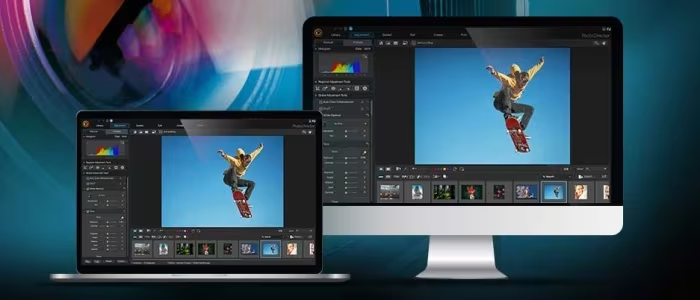
CyberLink PhotoDirector is an accessible, feature-packed photo editing suite that excels for hobbyists looking for creative, AI-assisted workflows without the steep learning curve of professional software. While it offers impressive variety—including layer support and creative effects—it struggles with performance speed and interface polish compared to industry leaders like Adobe Lightroom. It is best suited for social media creators and amateur photographers who prioritize ease-of-use and quick results over professional-grade, high-performance processing.
🔧 Key Specifications
Specifications sourced from reviewer mentions. Verify with manufacturer for complete details.
- Editing Style: Layer-based & Guided
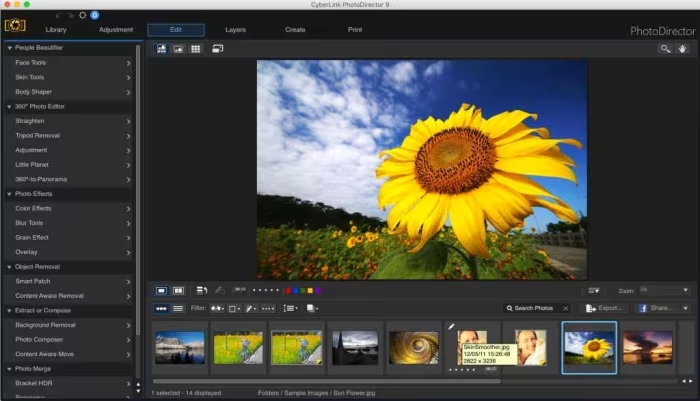
- AI Features: Integrated AI stylization, object removal, face tagging
- RAW Support: Yes (varies by version)
- Cloud Storage: 25GB (included in certain versions)
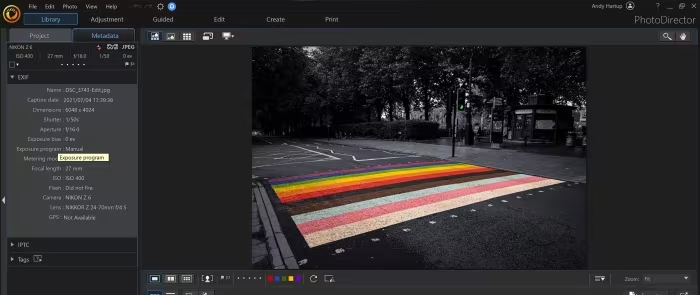
- Workflow: Menu-driven & Guided Edits
- Subscription: 365 model available
- Perpetual: Ultra versions available
💲 Price Range
Approximately ₹5,500 – ₹14,200
Prices range from annual subscriptions to perpetual licenses. Check current retailer pricing.
📊 What Reviewers Say — Feature by Feature
7 features evaluated across 9 sources.
👍 Key Strengths
- Easy to use for beginners
- Powerful layer-based editing support
- Affordable pricing and subscription options
- Creative AI-driven stylization tools
👎 Key Weaknesses
- Slow performance with large files
- Interface lacks professional polish
- Inconsistent AI feature reliability
- Limited advanced lens profile support
💰 Value for Money Analysis
Reviewers generally consider PhotoDirector a high-value alternative to the expensive Adobe Creative Cloud ecosystem. With perpetual license options around ₹8,300 and annual subscriptions starting near ₹5,500, it provides a comprehensive toolset at a fraction of the cost of professional software.
5 of 9 sources commented on price or value.
⚡ Where Reviewers Disagreed
The following areas saw meaningful disagreement across sources.
- Interface Design: 2 sources praised the clear layout, while 1 source heavily criticized the non-intuitive, menu-heavy interface. The disagreement stems from whether a user prefers a guided, menu-driven workflow or a traditional, toolbar-based professional interface.
- AI Quality: 3 sources hailed the AI tools as innovative and impressive, while 1 source labeled them as unreliable and low-quality. This suggests significant variance in user expectation and performance consistency across different software versions.
🎯 Who This Product Is For
Reviewer recommendations for different target audiences and use cases.
🛠️ Best Use Cases
- Creative Art ProjectsExcellent for artistic manipulation and stylized photos using the extensive library of style packages.Great
- Quick Social Media EditsStrong performance for creating animated effects and social-media-ready imagery.Great
- Complex RetouchingGuided edits can assist with complex tasks, though results can be inconsistent compared to professional tools.OK
🔀 Alternatives Mentioned by Reviewers
- Adobe Photoshop / Lightroom — The industry standard for professional photo editing. Reviewers consistently note that while PhotoDirector is cheaper, it lacks the performance, interface polish, and advanced toolsets offered by Adobe’s ecosystem. Choose Adobe if you are a professional or require industry-standard performance.
- Photoshop Elements — A streamlined, consumer-focused version of Photoshop. Often compared to PhotoDirector as a direct competitor for hobbyists. Reviewers note it is a strong alternative if you want a more traditional, Adobe-style interface.
- Paintshop Pro — Frequently cited as the closest competitor to PhotoDirector in terms of feature set and target audience. It is recommended for users who want a similar balance of guided tools and advanced features at a competitive price.
- Affinity Photo — A powerful, professional-grade competitor often mentioned as a superior choice for those who need more depth than PhotoDirector can offer, without the subscription-only model of Adobe.
- Pixelmator — Recommended for Mac users looking for a creative, consumer-friendly editor that is often more intuitive than PhotoDirector’s menu-heavy workflow.
- Luminar — Highlighted for its specialized AI focus; it is recommended if your primary goal is rapid, AI-driven aesthetic enhancements rather than traditional manual editing.
- Apple Photos — Mentioned as a basic, free alternative for Mac users. It is suitable only for very simple, non-creative edits and lacks the advanced manipulation tools found in PhotoDirector.
Alternatives sourced exclusively from reviewer mentions.
🛒 Buyer's Guide
✅ Buy This If…
- You are a beginner or hobbyist who wants an affordable, all-in-one suite.
- You value guided edits that simplify complex creative effects.
- You are a social media creator looking for quick, stylized photo enhancements.
- You prefer a one-time purchase or flexible subscription over expensive professional software.
❌ Skip This If…
- You are a professional photographer requiring industry-standard speed and performance.
- You work with massive batches of high-resolution files.
- You require advanced lens profiles and astrophotography-grade tools.
- You demand the most professional, toolbar-based interface experience.
⚠️ Things to Check Before Buying
- Check if the specific version (Ultra vs 365) includes the AI features you need, as some are subscription-locked.
- Verify if your specific printer model supports the software's soft-proofing workflow.
- Ensure your computer hardware is capable, as performance can be slow on older systems.
📈 Sentiment Trends Over Time
Reviews span from version 5 (2014 era) to 365 (2025). The following changes were detected:
- Feature Set — The software has consistently added more AI tools and layer-based functionality over time.
- Performance Expectations — As the software has become more feature-heavy, reviewers have become more critical of its performance speed and interface polish compared to modern standards.
CyberLink PhotoDirector remains a strong, high-value choice for hobbyists and creative users who need a comprehensive toolset without the professional price tag. While it lacks the raw speed and interface refinement of Adobe’s industry-leading software, its guided workflows and creative AI effects are perfect for casual users. If you are a beginner looking to step up from basic editors, this is an excellent, budget-friendly investment. Professionals, however, should look toward Adobe or Affinity Photo for the performance and depth they require.
Top Alternative: Paintshop Pro — It offers a very similar feature set and balance of guided tools, making it the closest direct alternative for this audience.