Screen Time Review

Screen Time Management & Alternatives
A cross-category analysis of digital wellbeing tools, parental controls, and screen-free hardware alternatives.
How This Score Is Calculated
- Sources analysed: 29 reviews across software and hardware
- Review period: Multi-year longitudinal data
- Value sources: 14 of 29 mentioned pricing
- Final score: 6.8/10 (weighted average of parental control apps and screen-free hardware)
- Most praisedPhysical friction tools
- Most criticisediOS feature limitations
- Value for moneyGood Value (7.2/10)
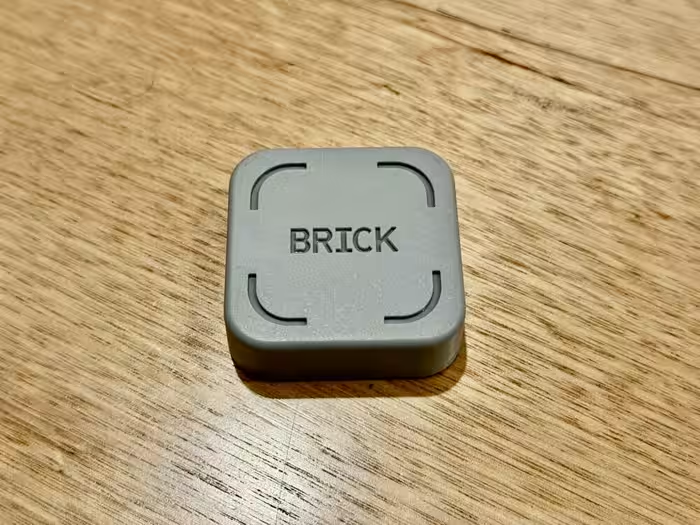
Managing screen time is increasingly bifurcated between software-based parental controls and hardware-based "screen-free" alternatives. While software tools like Qustodio and Screen Time (app) offer granular scheduling, they frequently struggle with iOS platform restrictions and privacy loopholes. Conversely, physical tools like the Brick or screen-free devices like StoryPhones and Camp Snap are highly praised for creating genuine behavioral change through physical friction, proving more effective than digital-only restrictions for many users.
📊 What Reviewers Say — Feature by Feature
Key aspects of screen management technology evaluated across 29 sources.
👍 Key Strengths
- Physical friction effectively breaks impulsive habits
- Dedicated kids-mode tablets foster safe learning
- Screen-free audio devices encourage active imagination
- Remote scheduling simplifies parental device management
👎 Key Weaknesses
- iOS software limitations restrict monitoring capabilities
- High subscription costs for basic filtering features
- Physical tags can be misplaced or bypassed
- Setup processes for parental software can be complex
💰 Value for Money Analysis
Value is polarized: software apps often require recurring subscriptions that add up, while hardware tools like the Brick (approx. ₹5,000) offer a one-time cost that many find more sustainable. Premium-priced hardware (like StoryPhones) is generally viewed as an investment in child development rather than a simple gadget.
14 of 29 sources commented on price or value.
⚡ Where Reviewers Disagreed
The following areas saw meaningful disagreement across sources.
- Effectiveness of Apps vs. Hardware: 9 sources argue software is sufficient for disciplined users, while 7 sources insist physical hardware is the only reliable way to stop doomscrolling.
🎯 Who This Product Is For
🛠️ Best Use Cases
- Parental Control Apps like Qustodio are best for cross-platform device scheduling. Great
- Habit Breaking Physical blockers are superior for stopping doomscrolling. Great
- Child Entertainment Screen-free audio players encourage imagination over passive video consumption. Good
🔀 Alternatives Mentioned by Reviewers
- Qustodio — The gold standard for granular cross-platform parental control, though it lacks some modern messaging monitoring.
- Brick — A physical NFC-based tool for creating screen-free time blocks; highly praised for its "physical friction" approach.
- StoryPhones — A premium, durable headphone solution that removes the screen entirely from children's entertainment.
- Camp Snap 2 — A screen-free digital camera that mimics disposable film, perfect for those wanting to capture memories without the distraction of a display.
- Kindle Kids — An excellent, distraction-free reading device that is strictly limited to literature, removing the temptation of games or media.
- Screen Time (App) — A budget-friendly scheduling app, though it suffers from significant functional limitations on iOS devices.
🛒 Buyer's Guide
✅ Buy This If…
- You are a parent seeking a safe, curated digital environment for your child.
- You have tried software-only blockers and found you can easily bypass them.
- You want to encourage creativity and imagination in children through screen-free audio.
❌ Skip This If…
- You rely entirely on iOS devices for monitoring (functionality is too limited).
- You are looking for a free solution and have strong personal self-discipline.
📈 Sentiment Trends Over Time
Reviews span several years of development. The following shift was detected:
- Physical Friction Tools — Shift from purely software-based restrictions to physical hardware solutions has been met with significantly higher user satisfaction.
Managing screen time is no longer a one-size-fits-all problem. For parents, software apps like Qustodio remain the standard, despite frustrating iOS constraints. For personal digital wellbeing, however, the industry has clearly pivoted toward physical hardware solutions like the Brick, which offer a far more effective "hard stop" than any app. If you are struggling with screen addiction, invest in physical friction; if you are a parent, prioritize dedicated, curated devices over generic tablets.