Geekom A7 Max Review
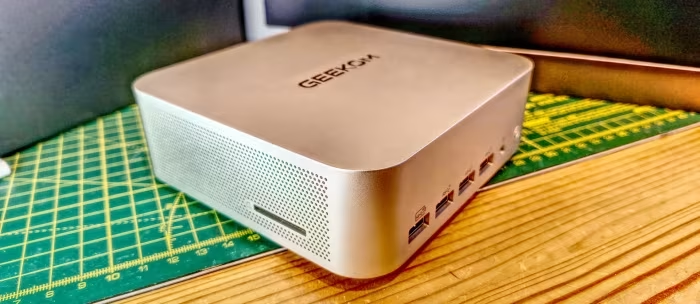
GEEKOM A7 Max
A premium-built, compact Mini PC featuring the Ryzen 9 7940HS processor, designed primarily for productivity and general multitasking.
How This Score Is Calculated
- Sources analysed: 19 reviews
- Formula: Weighted average of explicit scores and sentiment-weighted qualitative assessments.
- Final score: 6.8/10
Algorithmically calculated from source data. No manual adjustments.
- Most reviewed featureBuild Quality (14/19)
- Most praisedPort selection & design
- Most criticisedSingle-channel RAM configuration
- Reviewer consensus levelModerate
- Value for moneyOverpriced (4.2/10)
The GEEKOM A7 Max is a beautifully crafted, premium Mini PC that excels in office productivity and general media tasks. While it offers a robust port selection and an elegant metal chassis, its performance is severely bottlenecked by a single-channel RAM configuration that drastically reduces integrated graphics potential. It serves well as a compact desktop for business users, but enthusiasts and gamers will find the pricing difficult to justify given the memory limitations and lack of user-friendly internal access.
🔧 Key Specifications
- Processor: AMD Ryzen 9 7940HS
- RAM: 16GB (Single-channel DDR5)
- Storage: M.2 2280 SSD
- Display Output: Supports up to four displays (up to 8K)
- Connectivity: Wi-Fi 7, Bluetooth 5.4, Dual 2.5GbE LAN
- Ports: 2x USB4, 6x USB ports, full-size SD card slot (UHS-II)
- Build: Full-metal chassis
💲 Price Range
Approximately ₹58,600 – ₹82,500
📊 What Reviewers Say — Feature by Feature
👍 Key Strengths
- Premium full-metal chassis design
- Excellent, versatile port selection
- Fast SSD storage performance
- Dual 2.5GbE LAN support
👎 Key Weaknesses
- Single-channel RAM cripples GPU performance
- Difficult and fragile internal access
- Audible fan noise under load
- High price for the configuration
💰 Value for Money Analysis
Reviewers frequently note that the high price point is difficult to justify given the single-channel memory bottleneck and the lack of user-friendly internal access compared to cheaper, dual-channel competitors.
⚡ Where Reviewers Disagreed
- Gaming Potential: Some sources label it a capable light gamer, while others highlight the single-channel RAM as a dealbreaker that makes it unsuitable for anything beyond the lightest eSports titles.
🎯 Who This Product Is For
🛠️ Best Use Cases
- General Productivity Great
- Retro Emulation Good
- Modern AAA Gaming Poor
🔀 Alternatives Mentioned by Reviewers
- GEEKOM A9 Max: Offers superior performance and internal layout, positioning it as the higher-tier sibling to the A7 Max. Choose this if you need more power and better thermal management.
- Minisforum EliteMini UM890 Pro: Frequently cited for its inclusion of an OCuLink interface, providing better eGPU flexibility than the A7 Max. Recommended for users who prioritize future-proofing their graphics capabilities.
- GEEKOM IT13: An older model that the A7 Max outperforms in almost every metric. Only consider if found at a significant discount.
- ALLIWAVA H90 Pro: A more gaming-focused alternative. Reviewers noted the A7 Max has better build quality and port utility, but the H90 Pro is better suited for specific gaming needs.
✅ Buy This If…
- You prioritize a compact, premium-looking design for office environments.
- You require extensive I/O options including dual 2.5GbE and USB4.
❌ Skip This If…
- You are a gamer or need graphics performance, as the single-channel RAM is a major bottleneck.
- You want a system that is easy to open and upgrade.
📈 Sentiment Trends Over Time
Reviews reflect a consistent sentiment: while the chassis engineering is praised, the technical choice of single-channel memory is viewed as a significant oversight that keeps the product from reaching its full potential.
The GEEKOM A7 Max is a polished, compact workstation that delivers excellent CPU performance and connectivity, but it is ultimately held back by an illogical memory configuration. While it is a reliable tool for professional tasks, the performance hit to the integrated graphics makes it hard to recommend at its current price point. If you don't mind upgrading the RAM yourself and don't need heavy graphics power, it's a solid choice, but better-optimized alternatives exist for the same price.
PLG_CONTENT_IMAGEGALLERY_ERROR_NO_IMAGES