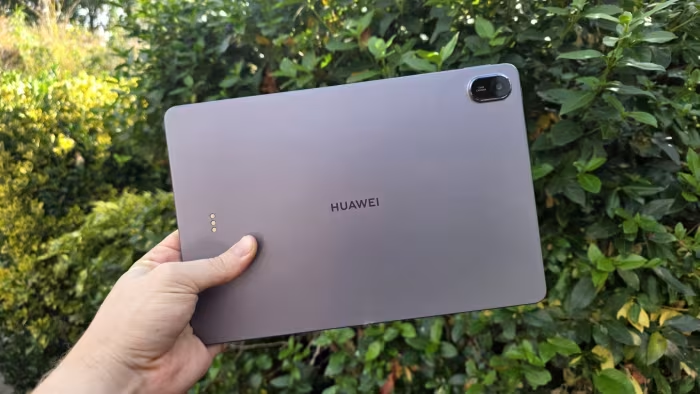
Huawei MatePad 11.5 2025 Review
Huawei MatePad 11.5 (2025)
A productivity-focused mid-range tablet featuring a signature PaperMatte anti-glare display and bundled accessory support.
How This Score Is Calculated
- Sources analysed: 6 reviews
- Sentiment-only: 6 sources (weighted 1.0×)
- Split: 3 Positive · 2 Mixed · 1 Negative
- Raw weighted average: 6.8
- Formula: Σ(score × weight) ÷ Σ(weight)
- Final score: 6.8/10 (rounded)
Algorithmically calculated from source data.
- Most reviewed featurePaperMatte Display (6/6)
- Most praisedAnti-glare display
- Most criticisedNo Google Services
- Reviewer consensus levelModerate
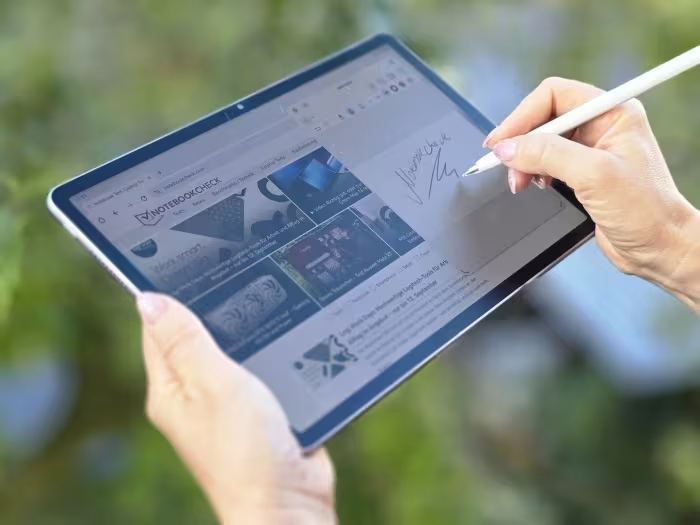
The Huawei MatePad 11.5 (2025) is a highly portable, productivity-oriented tablet defined by its standout PaperMatte anti-glare display, which excels for digital art and reading. While it offers solid battery life and a premium-feeling design, the lack of native Google Play Services remains a significant hurdle for many users. It is best suited for those who prioritize a comfortable drawing experience and media consumption over app-ecosystem flexibility.
🔧 Key Specifications
- Display: 11.5-inch PaperMatte anti-glare
- Battery: All-day battery life
- Charging: 40W wired
- Connectivity: Wi-Fi 6
- Accessories: Supports M-Pencil and Smart Keyboard
💲 Price Range
₹27,500 – ₹37,500
Prices sourced from reviews; regional and retailer variations apply.
📊 What Reviewers Say — Feature by Feature
5 features evaluated across 6 sources.
👍 Key Strengths
- Excellent anti-glare PaperMatte display
- Strong all-day battery life
- Lightweight, portable design
- Great for digital art
👎 Key Weaknesses
- No native Google Play Services
- Middling performance for gaming
- Limited Widevine L1 support
- No IP certification
💰 Value for Money Analysis
Reviewers generally consider it a good value proposition, particularly when the M-Pencil and keyboard are bundled. It is positioned as an affordable, productivity-focused alternative to more expensive flagship tablets.
6 of 6 sources commented on price or value.
⚡ Where Reviewers Disagreed
The following areas saw meaningful disagreement across sources.
- Bundled Accessories: 2 sources explicitly state accessories are included in the box for value, while 1 source notes they are sold separately, likely reflecting different regional market bundles.
🎯 Who This Product Is For
Reviewer recommendations for different target audiences and use cases.
🛠️ Best Use Cases
- Digital ArtThe PaperMatte display offers a tactile, paper-like feel that is excellent for sketching and drawing.Great
- Media ConsumptionGood speakers and a comfortable screen make it solid for movies, though limited Widevine support can hinder high-res streaming.Good
- Light ProductivityWith the keyboard, it serves well for typing and basic document editing, provided you don't rely heavily on Google Workspace.Good
🔀 Alternatives Mentioned by Reviewers
The following alternatives were highlighted as superior in specific performance or ecosystem categories.
- Xiaomi Pad 7 — Cited as a direct competitor offering superior Wi-Fi 6E connectivity, higher performance, and better overall value for power users.
- OnePlus Pad 3 — Mentioned as a larger-screen alternative, though the MatePad is noted to be more compact and portable by comparison.
- Apple iPad — Frequently compared as the benchmark for app ecosystem and performance, with reviewers noting the MatePad is cheaper but significantly more limited in software.
Alternatives sourced exclusively from reviewer mentions.
🛒 Buyer's Guide
✅ Buy This If…
- You are a digital artist who values a paper-like drawing surface.
- You need an affordable, portable tablet for reading and light typing.
- You can live without native Google Play Services.
❌ Skip This If…
- You rely heavily on Google apps for work or school.
- You are looking for a high-performance gaming tablet.
- You require official Widevine L1 certification for all streaming services.
⚠️ Things to Check Before Buying
- Confirm if the keyboard and M-Pencil are included in your regional retail bundle, as this varies.
- Verify that your essential work/school apps are available on Huawei AppGallery.
The Huawei MatePad 11.5 (2025) is a specialized tool that succeeds brilliantly in its niche as a drawing and reading tablet. Its PaperMatte display is its greatest asset, providing a premium experience at a mid-range price. However, the software ecosystem limitations and lack of Google services mean it is not for everyone. If you prioritize hardware comfort over app-store convenience, it is a great choice; otherwise, consider a competitor like the Xiaomi Pad 7.