iFlytek AINote Air 2 Review
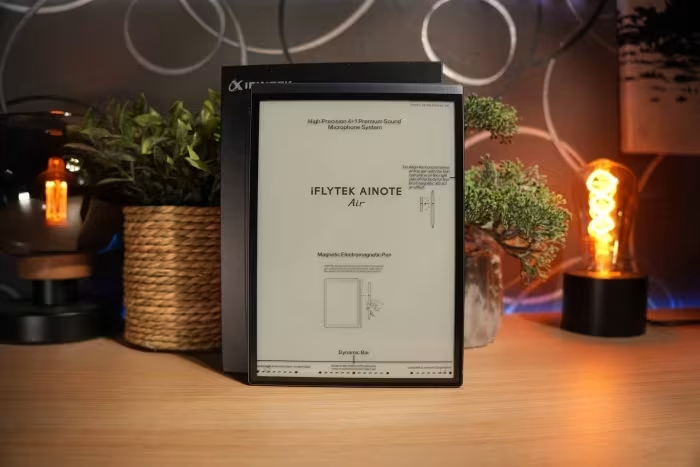
iFlytek AINOTE Air 2
A specialized 8.2-inch E-Ink digital notebook focused on AI-driven transcription, handwriting conversion, and distraction-free professional productivity.
How This Score Is Calculated
- Sources analysed: 6 reviews
- Sentiment-only: 6 sources (weighted 1.0×)
- Split: 4.5 Positive · 1.5 Mixed
- Formula: Σ(score × weight) ÷ Σ(weight)
- Final score: 7.7/10 (rounded)
- Most reviewed featureTranscription (6/6)
- Most praisedAI Transcription/Summarization
- Most criticisedLimited App Ecosystem
- Reviewer consensus levelHigh
- Value for moneyFair Value (6.0/10)
The iFlytek AINOTE Air 2 is a highly specialized E-Ink tablet designed specifically for transcription, note-taking, and meeting management rather than general-purpose multimedia. It earns high praise for its paper-like writing feel, reliable real-time voice-to-text, and sophisticated AI summarization tools. While it struggles with performance limitations, lack of Google Play Store access, and limited storage, it remains a powerful, distraction-free tool for students and professionals who prioritize productivity over entertainment.
🔧 Key Specifications
- Display: 8.2-inch E-Ink, matte, pressure-sensitive
- Storage: 32 GB (non-expandable)
- AI Features: Real-time transcription, summarization, translation (10 languages), ChatGPT integration
- Security: Fingerprint sensor, per-note encryption
- Build: Metal casing, slim and lightweight
- Extras: Pressure-sensitive stylus included, audio synchronization
💲 Price Range
Approximately ₹40,000 – ₹51,000 (or ~€550 RRP)
📊 What Reviewers Say — Feature by Feature
👍 Key Strengths
- Excellent AI transcription and meeting summaries
- Natural paper-like writing experience
- Elegant, slim, and lightweight metal design
- Distraction-free environment for focus
- Strong security with fingerprint and encryption
👎 Key Weaknesses
- No Google Play Store access
- Limited 32GB storage, no microSD slot
- Latency in system animations/navigation
- Poor built-in speaker quality
- Ineffective offline AI assistant
💰 Value for Money Analysis
Reviewers view this as a premium, specialized tool. While the AI capabilities justify the price for professionals, the hardware limitations (storage and lack of apps) make it feel pricey for those expecting a standard Android tablet experience.
⚡ Where Reviewers Disagreed
The following areas saw meaningful disagreement across sources.
- AI Assistant Utility: Some sources praise the AI-powered transcription and summarization as 'advanced' and 'excellent,' while others specifically label the 'offline AI assistant' as 'largely ineffective' or 'rather useless.'
🎯 Who This Product Is For
🛠️ Best Use Cases
- Meeting Transcription Excellent for real-time voice-to-text and generating summaries. Great
- Distraction-free Note-taking The paper-like screen and stylus are ideal for focused long-form writing. Great
- Multimedia Consumption Lacks the app ecosystem and refresh rates required for gaming or video. Poor
🔀 Alternatives Mentioned by Reviewers
- reMarkable 2 — A minimalist, distraction-free digital paper tablet. Reviewers suggest this if you want a pure writing experience without the AI bloat, though it lacks the advanced transcription features of the iFlytek.
- Onyx BOOX Note Air 2 — A more versatile, app-focused Android E-Ink tablet. Choose this if you need access to the Google Play Store and a wider variety of third-party apps for productivity.
- Lenovo Smart Paper — An alternative digital notebook that offers a similar hybrid productivity and reading experience. It is noted as a direct competitor in the E-Ink notepad market.
Alternatives sourced exclusively from reviewer mentions.
🛒 Buyer's Guide
✅ Buy This If…
- You are a professional or student needing dedicated meeting transcription.
- You prioritize a distraction-free environment for writing and reading.
- You value AI-driven summarization and organizational tools.
❌ Skip This If…
- You want a general-purpose Android tablet for media or gaming.
- You require Google Play Store app access.
- You need large amounts of onboard storage for files.
⚠️ Things to Check Before Buying
- Verify if the language support meets your specific regional needs.
- Be aware that cloud sync may require an active account.
- Understand that there is a learning curve for the AI productivity features.
The iFlytek AINOTE Air 2 is a powerful, niche productivity tool that excels at its core promise: professional-grade transcription and distraction-free note-taking. While it is hampered by a lack of app versatility and limited storage, its AI-driven summarization and high-quality writing experience make it a top-tier choice for heavy note-takers. Professionals and students who need to digitize information efficiently will find it indispensable, while those looking for a general-purpose tablet should look elsewhere.
Top Alternative: Onyx BOOX Note Air 2 — Choose this if you require a broader app ecosystem and Play Store access.
PLG_CONTENT_IMAGEGALLERY_ERROR_NO_IMAGES