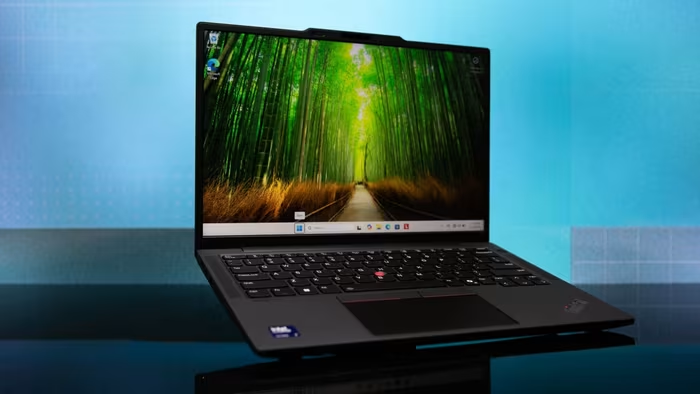
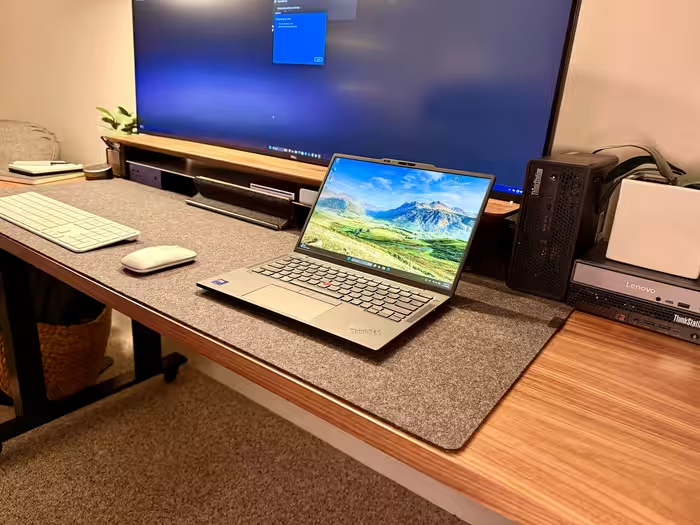
Lenovo ThinkPad X13 Gen 6 Review

Lenovo ThinkPad X13 Gen 6
A highly portable, durable business ultrabook designed for professional travelers prioritizing keyboard quality and connectivity over raw performance.
How This Score Is Calculated
- Sources analysed: 7 reviews
- Sentiment-only: 7 sources (weighted 1.0×)
- Split: 4 Positive · 2 Mixed · 1 Negative
- Raw weighted average: 6.8
- Formula: Σ(score × weight) ÷ Σ(weight)
- Final score: 6.8/10 (clamped, rounded to 1 decimal)
Algorithmically calculated from source data. No manual adjustments.
- Most reviewed featureKeyboard (6/7)
- Most praisedPortability & Build
- Most criticisedSoldered RAM/Performance
- Reviewer consensus levelModerate
The Lenovo ThinkPad X13 Gen 6 is a specialized tool for mobile business professionals, lauded primarily for its featherlight chassis, MIL-STD-810H durability, and an industry-leading tactile keyboard. While it excels in daily office workflows and portability, it faces criticism for soldered, non-upgradable RAM and significant performance throttling when running on battery power. It is an ideal companion for those who value input comfort and connectivity over high-end graphical or creative processing power.
🔧 Key Specifications
Specifications sourced from reviewer mentions. Verify with manufacturer for complete details.
- Display: 13.3-inch, 1920 x 1200 resolution
- Build Materials: Aluminum chassis
- Ports: USB-A, HDMI, Thunderbolt 4
- Durability: MIL-STD-810H certified
- Weight: ~2 lbs
- RAM: Soldered (Non-upgradable)
💲 Price Range
₹94,000 – ₹1,67,500
Prices reflect varied market listings and currency conversions cited in reviews. Check local retailer pricing.
📊 What Reviewers Say — Feature by Feature
6 features evaluated across 7 sources.
👍 Key Strengths
- Industry-leading tactile keyboard
- Extremely lightweight, portable design
- Excellent, versatile port selection
- MIL-STD-810H rugged durability
👎 Key Weaknesses
- Soldered RAM prevents upgrades
- Performance throttling on battery power
- Mediocre standard FHD display
- No integrated SD card reader
💰 Value for Money Analysis
Reviewers suggest the laptop is priced as a premium device, but its performance limitations make it harder to justify compared to the higher-end X1 series. Some suggest waiting for price drops before committing to the purchase.
4 of 7 sources commented on price or value.
⚡ Where Reviewers Disagreed
The following areas saw meaningful disagreement across sources.
- Performance: 2 sources praised its 'snappy' business performance, while 3 sources criticized significant throttling on battery and weak GPU capabilities. Disagreement appears rooted in different expectations: general office productivity versus power-user/creative requirements.
🎯 Who This Product Is For
🛠️ Best Use Cases
- Administrative Office WorkThe excellent keyboard and reliable port selection make it highly effective for document creation and email management.Great
- Travel/CommuteIts 2 lb weight and rugged chassis allow it to survive frequent travel without adding unnecessary bulk.Great
- Creative/DesignPerformance constraints and mediocre display quality make this a poor choice for visual or heavy editing workflows.Poor
🔀 Alternatives Mentioned by Reviewers
Maximise this list. Include EVERY single competitor, rival, or alternative product mentioned in any of the source reviews.
- Lenovo ThinkPad X1 Carbon — Frequently cited as the superior, higher-end alternative. It offers better performance and display options, though it comes at a higher price point. Choose this if you want the best possible ThinkPad experience.
- Dell XPS 13 — Compared as a stylish competitor that is slightly smaller but lacks the extensive port selection and lightweight advantage of the X13. Choose this if you prioritize aesthetics over functional connectivity.
- HP EliteBook 8 G1a — Noted as a direct competitor in the business space that is heavier and less portable than the X13. Choose the X13 if travel weight is your primary concern.
- ThinkPad X1 Yoga — A more premium, convertible alternative within the ThinkPad lineup that shares similar hardware but offers a more versatile form factor. Choose this if you need 2-in-1 functionality.
- Dell Pro 13 Premium — Mentioned as a competitor that the X13 outperforms in terms of portability and weight. Choose the X13 for a more travel-friendly experience.
Alternatives sourced exclusively from reviewer mentions.
✅ Buy This If…
- You are a business professional who travels frequently and values a lightweight build.
- You prioritize an industry-leading keyboard for long hours of typing.
- You require legacy ports like HDMI and USB-A without carrying dongles.
❌ Skip This If…
- You are a creative professional requiring high GPU performance or color-accurate displays.
- You want a device that allows for future RAM upgrades.
- You are on a tight budget and can find better performance-per-dollar elsewhere.
⚠️ Things to Check Before Buying
- Check for potential price drops, as the MSRP is often considered high relative to its performance.
- Verify if your specific workflow is impacted by the performance throttling observed while on battery power.
📈 Sentiment Trends Over Time
Reviews span multiple generations (Gen 2 to Gen 6). The following changes were detected:
- Display — Shifted from older aspect ratios to the taller 16:10 format in newer iterations.
- Chassis — Evolution toward sturdier aluminum materials over time.
The Lenovo ThinkPad X13 Gen 6 is a reliable, ultra-portable workhorse that shines for office professionals who prioritize input comfort and connectivity above all else. While it is held back by non-upgradable RAM and performance throttling on battery, its exceptional keyboard and rugged, lightweight chassis remain standout features. If you are a mobile professional, this is a solid choice, though you should keep an eye on sales to maximize value. For those seeking top-tier performance, consider the ThinkPad X1 Carbon instead.
Top Alternative: ThinkPad X1 Carbon — Offers superior performance and display options for those willing to pay a premium.