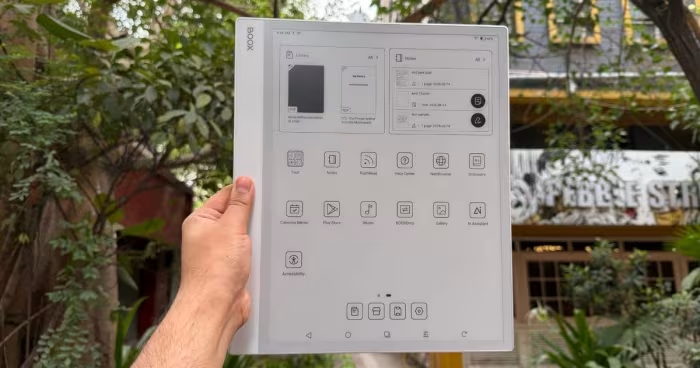
Onyx Boox Note Max Review

Onyx Boox Note Max
A large-format 13.3-inch E Ink digital notebook running full Android, designed for professional document management and academic workflows.
How This Score Is Calculated
- Sources analysed: 5 reviews
- Explicit scores: 0 sources (weighted 1.5×)
- Sentiment-only: 5 sources (weighted 1.0×)
- Split: 3 Positive · 2 Mixed · 0 Negative
- Raw weighted average: 7.2
- Formula: Σ(score × weight) ÷ Σ(weight)
- Review period: 2025
- Final score: 7.2/10 (clamped, rounded to 1 decimal)
Algorithmically calculated from source data. No manual adjustments.
- Most reviewed feature13.3-inch Display (5/5)
- Most praisedLarge A4-size Screen
- Most criticisedLack of Backlight/Input Lag
- Reviewer consensus levelModerate
The Onyx Boox Note Max is a specialized, large-format e-note featuring a massive 13.3-inch display that excels at handling A4-sized documents and academic PDFs. Unlike restricted e-readers, it offers the flexibility of a full Android operating system, though users must contend with potential input lag and inconsistent hardware features like the lack of a backlight in some models. It is a powerful tool for serious productivity, but its high price and niche focus make it less suitable for casual consumers.
🔧 Key Specifications
Specifications sourced from reviewer mentions. Verify with manufacturer for complete details.
- Display: 13.3-inch E Ink Carta 1300
- Processor: Snapdragon
- RAM: 6GB
- OS: Android 13
- Build: Thin and light
💲 Price Range
Approximately ₹54,500 – ₹55,000
Prices sourced from reviews. Check current retailer pricing.
📊 What Reviewers Say — Feature by Feature
3 features evaluated across 5 sources.
👍 Key Strengths
- Massive 13.3-inch E Ink display
- Full Android app versatility
- Excellent handwriting and note-taking feel
- Great for A4-sized documents
👎 Key Weaknesses
- Noticeable system and typing input lag
- Lack of integrated backlight
- High price point
- Inconsistent long-term software support
💰 Value for Money Analysis
Reviewers generally view the device as an expensive professional tool rather than a consumer value proposition. With prices around ₹55,000, it is noted to be significantly more expensive than other e-ink devices, leading to questions about whether the cost is justified for general users.
2 of 5 sources commented on price or value.
⚡ Where Reviewers Disagreed
The following areas saw meaningful disagreement across sources.
- Backlight Availability: 2 sources explicitly state the device lacks a backlight, while 1 source mentions a front-lit display with adjustable light. This likely reflects regional or generational model variations in the Onyx product line.
🎯 Who This Product Is For
Reviewer recommendations for different target audiences and use cases.
🛠️ Best Use Cases
- Document ManagementIdeal for handling large A4 academic papers and PDFs due to the 13.3-inch screen size.Great
- Handwritten Note-takingProvides a superior, paper-like writing experience suitable for focused productivity.Great
- General E-readingFunctions well for reading, though the lack of physical volume buttons and backlight (on some models) can be limiting.OK
🔀 Alternatives Mentioned by Reviewers
- Kindle Scribe — A locked-down, proprietary e-reader that offers a more streamlined, user-friendly experience compared to the Boox's complex Android environment.
- reMarkable (and reMarkable Pro) — The gold standard for focused, distraction-free digital note-taking; reviewers suggest these if you prefer a walled-garden approach over the Boox's versatility.
Alternatives sourced exclusively from reviewer mentions.
🛒 Buyer's Guide
✅ Buy This If…
- You are a professional or academic requiring a large 13.3-inch canvas for A4 documents.
- You need the versatility of full Android apps on an E Ink display.
- You prioritize a superior, paper-like handwriting feel for notes.
❌ Skip This If…
- You are a casual reader looking for a simple, out-of-the-box e-reader experience.
- You are sensitive to system latency and input lag.
- You are on a budget, as there are more affordable, specialized alternatives available.
⚠️ Things to Check Before Buying
- Verify if the specific model you are purchasing includes a front-lit display, as there is conflicting data across reviews.
- Be prepared to spend time tweaking system settings to achieve optimal performance.
- Consider the potential for inconsistent long-term software update support.
📈 Sentiment Trends Over Time
Reviews span 2024 to 2025. The following changes were detected:
- Performance — Newer generations (e.g., Max Lumi 2) show a 20% performance improvement over previous models, though input lag remains a recurring critique.
The Onyx Boox Note Max is an impressive piece of hardware for those who specifically need a large 13.3-inch screen for academic or professional document tasks. While its full Android capabilities and handwriting feel are top-tier, the system-wide input lag and high cost prevent it from being a universal recommendation. If your workflow demands maximum screen real estate and app flexibility, this is a strong pick. Otherwise, consider more refined, dedicated note-takers like the reMarkable series.
Top Alternative: reMarkable Pro — Choose this if you prefer a distraction-free, polished note-taking environment over the complexity of Android.