QNAP TBS-h574TX Review
QNAP TBS-h574TX
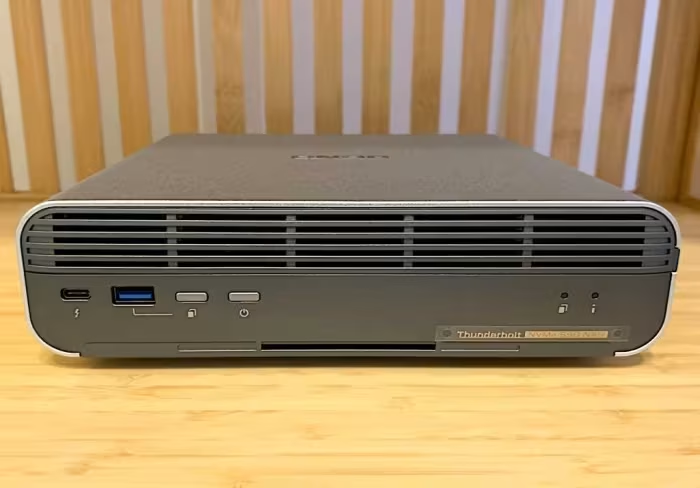
A compact, business-grade all-flash NASbook designed for content creators requiring high-speed storage and dual-connectivity.
How This Score Is Calculated
- Sources analysed: 5 reviews
- Sentiment-only: 5 sources (weighted 1.0×)
- Split: 3 Positive · 2 Mixed · 0 Negative
- Raw weighted average: 7.6
- Formula: Σ(score × weight) ÷ Σ(weight)
- Review period: 2024
- Final score: 7.6/10 (rounded to 1 decimal)
Algorithmically calculated from source data. No manual adjustments.
- Most reviewed featureFan Noise (5/5)
- Most praisedForm Factor & Design
- Most criticisedFan Noise
- Reviewer consensus levelHigh
The QNAP TBS-h574TX is a unique, ultra-compact NASbook that bridges the gap between portable DAS and network-attached storage, earning praise for its high-speed Thunderbolt 4 connectivity and support for both M.2 and E1.S NVMe SSDs. While it is widely considered an excellent tool for media workflows and creative workgroups, reviewers consistently highlight audible fan noise and non-upgradeable RAM as significant drawbacks. It is a premium, specialized device that trades absolute expandability for a sleek, desktop-friendly form factor.
🔧 Key Specifications
Specifications sourced from reviewer mentions. Verify with manufacturer for complete details.
- Processor: Intel Core i5 (Gen 13)
- RAM: 16GB (Non-upgradeable)
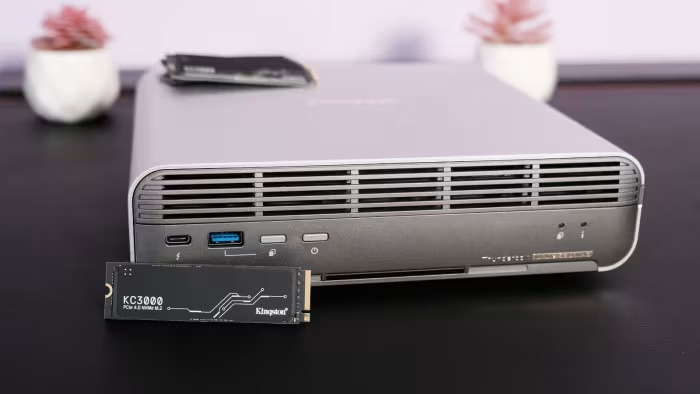
- Drive Support: M.2 and E1.S NVMe SSDs
- Connectivity: Dual Thunderbolt 4 ports, 10GbE Ethernet
- OS: QuTS hero
- PCIe Interface: Gen 3
💲 Price Range
₹1,25,000 – ₹3,56,800
Prices sourced from reviews. Check current retailer pricing.
📊 What Reviewers Say — Feature by Feature
6 features evaluated across 5 sources.
👍 Key Strengths
- Compact, professional-grade design
- Dual Thunderbolt 4 ports
- Versatile M.2/E1.S SSD support
- Excellent high-speed throughput
- Easy setup/turnkey operation
👎 Key Weaknesses
- Audible fan noise at idle/load
- Non-upgradeable system memory
- Limited to PCIe Gen3 speeds
- Expensive base unit pricing
- No included Thunderbolt cable
💰 Value for Money Analysis
Reviewers generally classify the device as premium and expensive, noting that while it offers unique professional features, the cost-per-gigabyte is high compared to building a DIY array. It is positioned as a specialized tool for creators where time-to-value and portability outweigh raw storage costs.
5 of 5 sources commented on price or value.
⚡ Where Reviewers Disagreed
The following areas saw meaningful disagreement across sources.
- Performance Expectations: 3 sources praised its performance for media workflows, while 2 sources highlighted performance bottlenecks due to the PCIe Gen3 interface and CPU choices. Disagreement stems from the user's intended workload: general storage vs. intensive creative editing.
🎯 Who This Product Is For
Reviewer recommendations for different target audiences and use cases.
🛠️ Best Use Cases
- Portable Media EditingThe small form factor and Thunderbolt 4 support make it a powerful, portable companion for on-the-go video editing.Great
- Shared Workgroup StorageExcellent for teams needing a mix of direct-attached speed and network-attached accessibility for project files.Good
🔀 Alternatives Mentioned by Reviewers
- OWC Express 4M2 — Mentioned as a simpler, RAID0-based DAS alternative. Reviewers note that while cheaper, it lacks the ZFS-based data protection and dual-connectivity NAS functionality of the QNAP.
- DIY M.2/SSD Arrays — Reviewers frequently suggest that users can build a much cheaper storage array using traditional M.2 SSDs. However, they note these lack the specialized E1.S design and turnkey professional convenience of the TBS-h574TX.
Alternatives sourced exclusively from reviewer mentions.
🛒 Buyer's Guide
✅ Buy This If…
- You are a media professional needing a compact, all-flash storage solution for creative workflows.
- You require the flexibility of both Thunderbolt 4 (DAS) and 10GbE (NAS) connections in one device.
- You value enterprise-grade features like ZFS and E1.S drive support in a portable form factor.
❌ Skip This If…
- You are highly sensitive to fan noise in a quiet office environment.
- You are on a budget or need a simple, high-capacity bulk storage solution.
- You require the ability to upgrade your system RAM as your project needs grow.
⚠️ Things to Check Before Buying
- Note that a Thunderbolt cable is not included in the box.
- Be aware of the persistent fan noise and the 16GB RAM limitation before purchase.
- Verify if your specific SSDs are compatible with the E1.S/M.2 slots to ensure full performance.
The QNAP TBS-h574TX is an impressive, high-performance NASbook that excels in creative and media-focused environments. Its dual-connectivity and support for advanced SSD standards make it a unique professional tool, though the audible fan noise and non-upgradeable memory are notable compromises. If you need a compact, turnkey storage solution for high-end media editing, this is a top-tier choice. For those seeking budget-friendly storage or absolute silence, consider a traditional DIY storage array instead.