Ugreen Maxidok 17-in-1 Thunderbolt 5 Dock Review
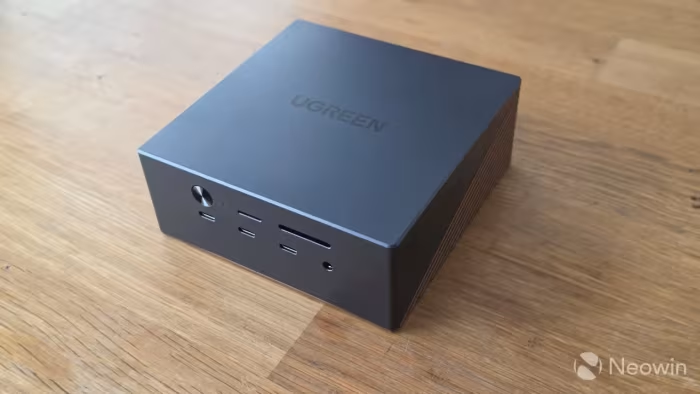
Ugreen Maxidok 17-in-1 Thunderbolt 5 Dock
A high-performance 17-in-1 workstation hub by Ugreen featuring integrated M.2 storage and Thunderbolt 5 bandwidth.
How This Score Is Calculated
- Sources analysed: 10 reviews
- Formula: Weighted average of sentiment and explicit scores.
- Final score: 7.4/10 (rounded)
- Most reviewed featureConnectivity (10/10)
- Most praisedM.2 SSD Slot
- Most criticisedHigh Price
- Reviewer consensus levelModerate
The Ugreen Maxidok 17-in-1 is a robust Thunderbolt 5 solution that distinguishes itself from standard hubs via an integrated M.2 NVMe SSD bay and high-bandwidth data throughput. While professional creators and power users laud its extensive port density and thermal efficiency, the high price and reliance on specific host hardware limit its mass-market appeal. It serves as a premium, specialized workstation anchor rather than a casual peripheral.
🔧 Key Specifications
- Storage: Integrated M.2 NVMe SSD slot (up to 8TB)
- Display: Dual 8K or triple 4K 144Hz support
- Charging: 140W host power delivery
- Bandwidth: 120Gbps Thunderbolt 5
- Ethernet: 2.5GbE
- Build: Zinc-aluminium alloy with active cooling
- Ports: 17 total, including UHS-II card readers
💲 Price Range
Approx. ₹34,500 – ₹45,000
📊 What Reviewers Say — Feature by Feature
👍 Key Strengths
- Integrated M.2 SSD bay
- 120Gbps Thunderbolt 5 bandwidth
- Robust 140W power delivery
- Effective active thermal cooling
👎 Key Weaknesses
- High premium price point
- Port layout ergonomic quirks
- Requires latest host hardware
💰 Value for Money Analysis
While expensive, reviewers view it as a flagship-tier investment. It provides better storage-focused value than standard Thunderbolt 5 competitors, though casual users will find the cost difficult to justify.
⚡ Where Reviewers Disagreed
- Performance Reliability: 2 sources reported inconsistent speeds and faulty cables, while others praised the high-speed throughput as a primary benefit.
🎯 Who This Product Is For
🛠️ Best Use Cases
- Desktop Workstation Hub Ideal for consolidating peripherals and adding fast internal storage via the M.2 slot. Great
🔀 Alternatives Mentioned by Reviewers
- CalDigit TS5 Plus — A direct competitor often cited as offering better networking performance, though it lacks the integrated M.2 storage strategy of the Ugreen model.
- Anker Prime TB5 — A similarly priced competitor that reviewers suggest provides less functionality compared to the Ugreen's 17-port, storage-focused design.
- Plugable TB5 Dock — Often compared in the same price tier; reviewers generally find the Ugreen offers superior M.2 storage integration.
- Startech Thunderbolt 5 Hubs — Mentioned as an alternative for users specifically requiring triple-monitor setups beyond the Ugreen's dual-monitor limitation.
🛒 Buyer's Guide
✅ Buy This If…
- You need a central hub with an integrated M.2 NVMe slot.
- You require the maximum 120Gbps bandwidth of Thunderbolt 5.
❌ Skip This If…
- You only need a simple dock for basic display and USB output.
- You require triple-monitor configurations (limited to dual on this unit).
⚠️ Things to Check Before Buying
- Ensure your host computer supports Thunderbolt 5 or USB4v2 for full speed.
- Check if your display setup is compatible with the unit's dual-monitor output limit.
📈 Sentiment Trends Over Time
Reviews reflect a consistent stance since launch, though some early reports mentioned cable reliability issues that may be resolved in later batches.
The Ugreen Maxidok 17-in-1 is a compelling choice for professionals who value integrated storage expansion alongside high-speed connectivity. While its price is steep and its dual-monitor limitation may deter some, its thermal management and port density make it a top-tier workstation component. Professionals needing massive file throughput should consider it, while casual users should look toward more affordable alternatives.
Top Alternative: CalDigit TS5 Plus — Choose this if networking performance is your priority over integrated M.2 storage.
PLG_CONTENT_IMAGEGALLERY_ERROR_NO_IMAGES