Adobe Photoshop Review
Adobe Photoshop Elements
A consumer-focused, one-time purchase photo editing suite by Adobe designed for beginners and hobbyist photographers.
How This Score Is Calculated
- Sources analysed: 38 reviews
- Raw weighted average: 7.8/10
- Value sources: 24 of 38 mentioned price/value
- Final score: 7.8/10 (rounded)
- Most reviewed featureGuided Edits (38/38)
- Most praisedEase of use
- Most criticisedThree-year license model
- Reviewer consensus levelHigh
- Value for moneyGood Value (7.5/10)
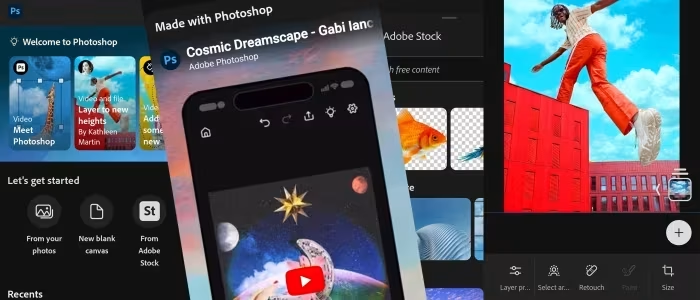
Adobe Photoshop Elements is widely regarded as the premier entry-level photo editing suite, effectively bridging the gap between basic tools and professional complexity. It is celebrated for its "Guided Edits" and AI-driven automation, which allow casual users to achieve impressive results without the steep learning curve of full Photoshop. However, recent shifts toward a three-year licensing model and persistent UI stagnation have drawn criticism from long-time users.
🔧 Key Specifications
- Platform: Windows and macOS
- License: 3-year limited license
- Editing Modes: Quick, Guided, Advanced
- AI Features: Sensei-powered selection, auto-tagging, subject extraction
- Organizer: Integrated media management tool included
- RAW Support: Basic Adobe Camera Raw integration
💲 Price Range
Approximately ₹7,300 – ₹10,500
Prices vary by region and bundle availability.
📊 What Reviewers Say — Feature by Feature
Key features evaluated across 38 sources.
👍 Key Strengths
- Excellent Guided Edits for learning
- Powerful AI-driven automation tools
- Robust Organizer for media management
- No monthly subscription fees
👎 Key Weaknesses
- Three-year limited license term
- Dated user interface design
- Limited advanced RAW support
- Confusing menu organization
💰 Value for Money Analysis
Reviewers consistently highlight the lack of a monthly subscription as a primary value driver. While the 3-year license is a point of contention, it remains significantly cheaper than the full Adobe Creative Cloud suite for casual photographers.
⚡ Where Reviewers Disagreed
- Interface Modernity: 15 sources describe it as "intuitive" while 12 sources call it "dated" or "cluttered." This disagreement often stems from whether the reviewer is comparing it to professional software or free, modern mobile apps.
🎯 Who This Product Is For
🛠️ Best Use Cases
- Family Photo Organization The integrated Organizer and facial recognition tools make it excellent for managing large personal photo libraries. Great
- Social Media Content Guided edits for quick filters, resizing, and creative overlays are perfectly suited for casual social media sharing. Good
🔀 Alternatives Mentioned by Reviewers
- Corel PaintShop Pro — Frequently cited as a more powerful, perpetual-license alternative for Windows users. Many reviewers prefer its unified workspace over Adobe’s split Organizer/Editor model.
- Affinity Photo — Recommended for power users who want professional-grade tools at a flat, one-time price without the subscription model of full Photoshop.
- Adobe Photoshop CC — The professional industry standard. Reviewers suggest this only for those who need advanced, non-linear workflows and are willing to pay the monthly subscription.
- Lightroom — Often compared for library management and RAW processing; reviewers find it more efficient for photographers, while Elements is better for creative manipulation.
- CyberLink PhotoDirector — A direct competitor in the budget-friendly, AI-heavy space, praised for its all-in-one workspace.
✅ Buy This If…
- You are a hobbyist who hates monthly subscriptions.
- You want a step-by-step learning path for editing.
- You need a central, automated way to manage a large photo library.
❌ Skip This If…
- You are a professional needing advanced color control and CMYK support.
- You are already comfortable with more advanced, subscription-based suites.
📈 Sentiment Trends Over Time
Reviews span 2009 to 2026. The following changes were detected:
- Licensing Model — Sentiment shifted from praise for "one-time purchase" to frustration over the new "3-year limited license" term.
- AI Features — Early versions lacked automation; modern versions (2020-2026) are highly praised for Sensei-powered efficiency.
Adobe Photoshop Elements remains a robust and accessible choice for those who want professional-style results without the professional-grade subscription cost. While the interface is showing its age and the new 3-year licensing model is a step backward, the combination of powerful AI tools and Guided Edits makes it a must-have for hobbyists. If you are a beginner, it is the best starting point in the Adobe ecosystem.