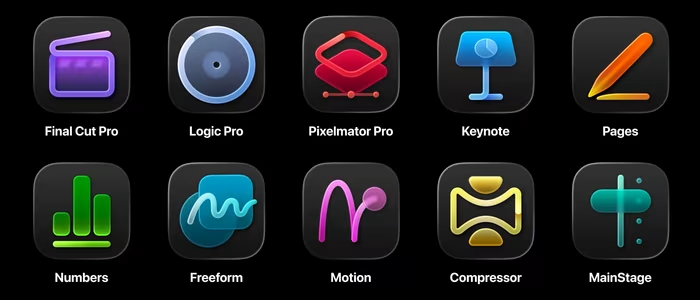
Apple Creator Studio Review
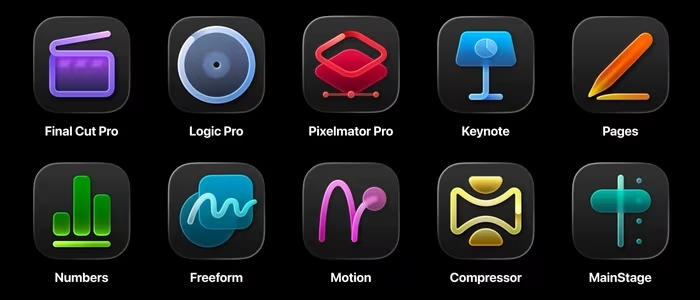
Apple Creator Studio
A powerful, subscription-based software bundle for Mac and iPad, integrating professional creative tools with AI-driven workflow enhancements.
How This Score Is Calculated
- Sources analysed: 10 reviews
- Explicit scores: 0 sources (weighted 1.5×)
- Sentiment-only: 10 sources (weighted 1.0×)
- Split: 8 Positive · 2 Mixed · 0 Negative
- Raw weighted average: 8.4
- Formula: Σ(score × weight) ÷ Σ(weight)
- Review period: January 2026
- Value sources: 7 of 10 mentioned price or value
- Final score: 8.4/10
- Most reviewed featureValue/Subscription (7/10)
- Most praisedCross-platform Integration
- Most criticisedSubscription model lock-in
- Reviewer consensus levelHigh
- Value for moneyExcellent Value (8.6/10)
Apple Creator Studio is a high-value subscription suite that bundles industry-standard creative tools like Final Cut Pro and Logic Pro with deep iPad-Mac integration. Reviewers praise its cost-effectiveness compared to individual app purchases and the addition of practical AI-driven workflow features. While it creates a cohesive ecosystem for power users, it remains strictly locked within the Apple hardware environment, which may frustrate those seeking cross-platform flexibility.
🔧 Key Specifications
Specifications sourced from reviewer mentions.
- Core Apps: Final Cut Pro, Logic Pro, Pixelmator Pro (plus others)
- Compatibility: macOS and iPadOS
- AI Features: Visual search, transcript analysis, timeline intelligence
- Storage/Sync: Seamless project syncing across Apple devices
- Subscription Perks: Family sharing included
💲 Price Range
Approx. ₹10,800–₹11,000 per year
Also available at approx. ₹1,080–₹1,100 per month.
📊 What Reviewers Say — Feature by Feature
7 features evaluated across 10 sources.
👍 Key Strengths
- Significant cost savings over individual purchases
- Excellent Mac and iPad workflow integration
- Powerful AI-driven search and editing tools
- Family sharing support included in subscription
- Coherent suite for video and music
👎 Key Weaknesses
- Locked into the Apple ecosystem
- Subscription model not for everyone
- App integration could be tighter
- Overwhelming for new creative users
- File management on iPad can be tricky
💰 Value for Money Analysis
Reviewers view this as one of Apple's best-value products, especially for students and professionals who already use multiple apps. The bundle breaks even compared to individual perpetual licenses over approximately four years.
7 of 10 sources commented on price or value.
⚡ Where Reviewers Disagreed
The following areas saw meaningful disagreement across sources.
- Integration Depth: 3 sources praised the seamless integration, while 2 sources noted that integration between individual suite apps still feels disjointed and requires improvement.
🎯 Who This Product Is For
Reviewer recommendations for different target audiences and use cases.
🛠️ Best Use Cases
- Video and Music Production Highly recommended for editors needing a cohesive suite of tools that work well together. Great
- Mobile Creative Work Ideal for users who split their time between a Mac desktop and an iPad on the go. Good
🔀 Alternatives Mentioned by Reviewers
Maximise this list. Include EVERY single competitor, rival, or alternative product mentioned in any of the source reviews.
- Adobe Creative Cloud — The direct competitor to Apple's bundle; reviewers note that while Adobe is the industry standard for cross-platform, Apple's suite offers better AI-timeline integration for Mac-native users.
- Affinity Suite — Mentioned as a major alternative that offers an all-in-one app for free, making it a strong budget-friendly competitor for graphic designers specifically.
- Blackmagic DaVinci Resolve — Frequently compared to Final Cut Pro; noted for its professional-grade color grading and project portability that sometimes exceeds Apple's current capabilities.
Alternatives sourced exclusively from reviewer mentions.
🛒 Buyer's Guide
✅ Buy This If…
- You are a student or professional who uses multiple Apple creative apps.
- You want a unified workflow between your Mac and your iPad.
- You prefer an all-in-one subscription over managing individual software licenses.
❌ Skip This If…
- You require cross-platform support for Windows or Linux.
- You are a casual user who only needs one specific app, not the whole suite.
- You strictly refuse to engage with subscription-based software models.
⚠️ Things to Check Before Buying
- Verify your iPad and Mac compatibility for the latest AI features.
- Consider if you need the full suite or if individual perpetual licenses still offer better long-term value for your specific use case.
📈 Sentiment Trends Over Time
Reviews span January 2026. The following changes were detected:
- AI Integration — Early reports suggest AI tools are becoming more refined and helpful for routine creative tasks.
Apple Creator Studio is an outstanding value for dedicated Mac and iPad users, offering a cohesive and powerful suite of professional tools. While the subscription model and ecosystem lock-in will deter some, the sheer cost savings and AI-enhanced workflow features make it a must-have for most creative professionals. If you are already invested in Apple hardware, this is the most efficient way to manage your creative software.
Top Alternative: Adobe Creative Cloud — Choose this if you require cross-platform compatibility and industry-standard collaboration tools.