ASUS ROG Harpe Ace Aim Lab Edition Review
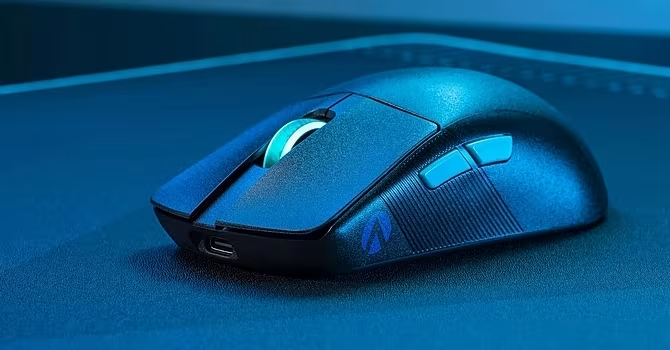
ASUS ROG Harpe Ace Aim Lab Edition
An ultra-lightweight, high-performance wireless gaming mouse designed specifically for esports and competitive FPS players.
How This Score Is Calculated
- Sources analysed: 6 reviews
- Explicit scores: 4 sources (weighted 1.5×)
- Sentiment-only: 2 sources (weighted 1.0×)
- Split: 5 Positive · 1 Mixed · 0 Negative
- Raw weighted average: 8.7
- Formula: Σ(score × weight) ÷ Σ(weight)
- Consensus bonus +0.3: 85% agreement
- Final score: 8.7/10
- Most reviewed featureWeight (6/6)
- Most praisedSensor Performance
- Most criticisedShape/Ergonomics
- Reviewer consensus levelHigh
The ASUS ROG Harpe Ace Aim Lab Edition is widely regarded as a top-tier esports mouse, lauded for its incredibly low 54g weight and near-perfect sensor accuracy. While it offers industry-leading performance for competitive shooters, its specific shape—featuring a pronounced middle hump and narrow body—is polarizing and may require an adjustment period. It is an ideal choice for gamers prioritizing raw performance over productivity features.
🔧 Key Specifications
- Weight: 54 grams
- Sensor: ROG AimPoint Optical
- Max CPI: 36,000
- Battery Life: Up to 99 hours
- Connectivity: Wireless (Speednova), Bluetooth, Wired
- Included: Grip tape, replacement PTFE feet
💲 Price Range
₹12,500 – ₹22,112
Prices sourced from reviews.
📊 What Reviewers Say — Feature by Feature
👍 Key Strengths
- Incredible 54g lightweight design
- Near-perfect sensor accuracy
- Extremely low click latency
- Stable Speednova wireless performance
- Useful Aim Lab software integration
👎 Key Weaknesses
- Polarizing narrow shape
- Side buttons difficult to reach
- Limited software functionality
- No tilt-scroll or infinite scroll
- Premium price point
💰 Value for Money Analysis
Reviewers acknowledge the high performance but note the premium pricing (up to ₹22,112). While it offers competitive specs against market leaders, the cost is a significant investment.
5 of 6 sources commented on price or value.
⚡ Where Reviewers Disagreed
- Shape and Comfort: 3 sources praised the design for esports, while 3 sources highlighted that the narrow body and middle hump require a significant adjustment period or may not suit all hand sizes.
🎯 Who This Product Is For
🛠️ Best Use Cases
- Esports/Competitive Gaming Performance is peerless, benefiting from the AimPoint sensor and low-latency wireless. Great
- General Productivity Lacks advanced features like infinite scrolling or extensive button programmability. Poor
🔀 Alternatives Mentioned by Reviewers
- Logitech G Pro X Superlight / 2 — The primary competitor in the lightweight esports space. Reviewers note it as the industry standard, with the Harpe Ace often compared directly for its better sensor specs and lighter weight.
- Razer DeathAdder V3 Pro — A major rival for ergonomics. Choose this if you prefer an ergonomic shape over the ambidextrous, narrow design of the Harpe Ace.
- Razer Viper V2 Pro — A direct competitor in the high-end wireless space; often compared for its similar performance and weight profile.
- Logitech G403 — Used as a benchmark for latency and sensor performance; the Harpe Ace is noted to match or exceed this performance.
🛒 Buyer's Guide
✅ Buy This If…
- You play competitive FPS games and need a sub-60g mouse.
- You want Aim Lab integration to optimize your settings.
- You value low click latency and stable wireless connectivity above all else.
❌ Skip This If…
- You prefer ergonomic shapes over narrow, ambidextrous designs.
- You need a mouse for productivity with infinite scroll or many side buttons.
- You are a casual user who does not need specialized esports features.
The ASUS ROG Harpe Ace Aim Lab Edition is an elite-level tool for competitive gamers, delivering industry-leading sensor performance and an incredibly low weight. While the shape is somewhat polarizing, those who find it comfortable will be rewarded with one of the most precise wireless mice on the market. It is a must-buy for esports enthusiasts, though productivity-focused users should look elsewhere.
PLG_CONTENT_IMAGEGALLERY_ERROR_NO_IMAGES