Elgato 4K X Review
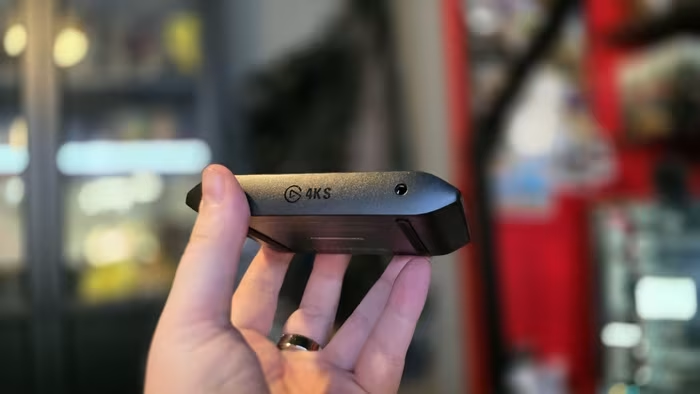
Elgato 4K X
A high-performance external capture card by Elgato designed for professional-grade 4K gaming and streaming workflows.
How This Score Is Calculated
- Sources analysed: 12 reviews
- Explicit scores: 10 sources (weighted 1.5×)
- Sentiment-only: 2 sources (weighted 1.0×)
- Raw weighted average: 8.8
- Formula: Σ(score × weight) ÷ Σ(weight)
- Most reviewed featurePlug-and-play (9/12)
- Most praised4K 144Hz Support
- Most criticisedCable/Connectivity issues
- Reviewer consensus levelHigh
- Value for moneyGood Value (7.6/10)
The Elgato 4K X is widely regarded as the gold standard for external capture cards, offering best-in-class 4K 144Hz recording and seamless HDMI 2.1 passthrough. Reviewers praise its plug-and-play reliability and compact form factor, which eliminates the need for internal PCIe slots. While some users report minor connectivity quirks and a premium price tag, it remains the definitive choice for professional creators needing high-fidelity performance.
🔧 Key Specifications
- Resolution: Up to 4K 144Hz capture/passthrough
- Interface: USB-C (USB 3.2)
- Features: VRR, HDR10, 3.5mm line-in
- Compatibility: Windows, macOS, iPadOS, Xbox Series X|S, PS5
💲 Price Range
₹19,000 — ₹25,000
📊 What Reviewers Say — Feature by Feature
Features evaluated across 12 sources.
👍 Key Strengths
- Exceptional 4K 144Hz capture performance
- True plug-and-play ease of use
- Compact, portable, sleek design
- Full VRR and HDR10 support
👎 Key Weaknesses
- Occasional signal detection/handshake issues
- High premium price point
- Limited cables included in box
💰 Value for Money Analysis
Reviewers generally consider the Elgato 4K X a strong value proposition compared to high-end internal cards and competing external units like the AVerMedia Live Gamer Ultra 2.1. While it carries a premium price, the combination of 4K 144Hz support and ecosystem stability justifies the cost for serious creators.
⚡ Where Reviewers Disagreed
- Mac/iPad Compatibility: 4 sources praised the compatibility, while 2 sources cited historical unreliability, suggesting a software-dependent experience.
🎯 Who This Product Is For
🛠️ Best Use Cases
- High-Refresh Gaming Essential for capturing 144Hz footage without frame loss. Great
- Portable Streaming Small form factor allows for easy transport for mobile setups. Great
🔀 Alternatives Mentioned by Reviewers
- AVerMedia Live Gamer Ultra 2.1 — Frequently compared as a direct competitor; reviewers note it is often more expensive and offers less ecosystem integration than the 4K X. Choose the Elgato 4K X for better value and ecosystem support.
- Elgato HD60 X — The previous generation standard; while cheaper, it lacks the 4K 144Hz capabilities of the 4K X. Only choose the HD60 X if you are on a strict budget and do not require 4K high-refresh capture.
- Elgato 4K Pro — An internal PCIe card; while it offers high performance, the 4K X is preferred by reviewers for external convenience and portability.
- Elgato 4K60 S+ — A standalone, SD-card recording solution; significantly more expensive and limited to 4K60. Choose this only if you specifically need standalone, PC-free recording.
🛒 Buyer's Guide
✅ Buy This If…
- You need 4K 144Hz capture for high-end consoles.
- You prefer an external device over internal PCIe cards.
- You want a reliable, plug-and-play solution for OBS.
❌ Skip This If…
- You are a casual user who only needs 1080p recording.
- You require a budget-friendly option under ₹15,000.
📈 Sentiment Trends Over Time
Reviews indicate a positive trajectory following software updates.
- Software Stability — Early connectivity/audio issues were largely addressed by post-launch software updates, improving user experience.
The Elgato 4K X is the best external capture card on the market for modern, high-refresh gaming content. Its ability to handle 4K 144Hz signals makes it a necessary upgrade for professional creators using PS5 or Xbox Series X. Despite a premium price and occasional cable sensitivity, its ease of use and performance make it a must-buy. We highly recommend this over competing cards for most users.
PLG_CONTENT_IMAGEGALLERY_ERROR_NO_IMAGES