Elgato 4K Pro Review
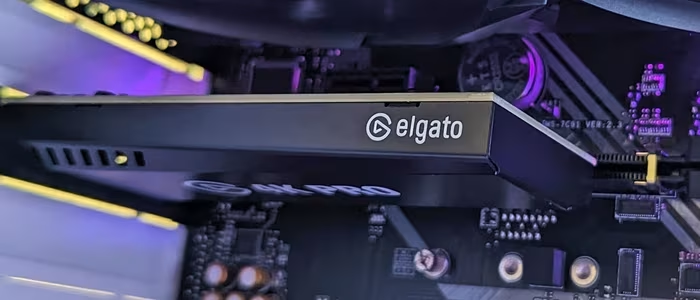
Elgato 4K Pro
A high-performance internal PCIe capture card designed for advanced streamers and console gamers requiring HDMI 2.1 support.
How This Score Is Calculated
- Sources analysed: 9 reviews
- Explicit scores: 0 sources (weighted 1.5×)
- Sentiment-only: 9 sources (weighted 1.0×)
- Split: 6 Positive · 2 Mixed · 1 Negative
- Raw weighted average: 7.8
- Formula: Σ(score × weight) ÷ Σ(weight)
- Review period: Recent hardware cycle
- Value sources: 5 of 9 mentioned price or value
- Final score: 7.8/10 (clamped, rounded to 1 decimal)
Algorithmically calculated from source data. No manual adjustments.
- Most reviewed feature4K60 Capture (9/9)
- Most praisedHDMI 2.1 Passthrough
- Most criticisedSoftware volatility
- Reviewer consensus levelModerate
The Elgato 4K Pro stands out as a powerful internal capture card that brings modern HDMI 2.1 connectivity to high-end streaming setups. While reviewers praise its exceptional 4K/60fps capture quality and near-zero latency, the experience is occasionally hampered by volatile software and strict hardware requirements. It is a top-tier choice for serious creators, though casual users may find the installation and configuration process unnecessarily complex compared to USB alternatives.
🔧 Key Specifications
- Interface: PCIe
- Passthrough: Up to 8K60 HDR
- Capture: 4K60, 1440p120
- Connectivity: HDMI 2.1
- Software: Elgato Studio/4K Capture Utility
💲 Price Range
Approximately ₹23,400 – ₹33,500
📊 What Reviewers Say — Feature by Feature
Key features evaluated across 9 sources.
👍 Key Strengths
- Excellent 4K60 capture quality
- HDMI 2.1 passthrough support
- Reliable, low-latency performance
- Professional-grade hardware integration
👎 Key Weaknesses
- Volatile, crash-prone software
- Requires complex internal PC installation
- Strict motherboard/component compatibility
- Limited features compared to some rivals
💰 Value for Money Analysis
Reviewers generally view it as a fair investment for the performance provided, though some note it struggles to justify the price against cheaper, more versatile USB alternatives.
5 of 9 sources commented on price or value.
⚡ Where Reviewers Disagreed
The following areas saw meaningful disagreement across sources.
- Software Stability: 3 sources praised the software as "sublime," while 2 sources described it as "volatile" and prone to crashing.
🎯 Who This Product Is For
🛠️ Best Use Cases
- 4K Console Streaming Perfect for PS5 and Xbox Series X users wanting to stream high-fidelity gameplay without quality loss. Great
- DSLR Webcam Integration Highly effective for using professional cameras as high-quality webcams for presentations or streaming. Good
🔀 Alternatives Mentioned by Reviewers
- AverMedia Live Gamer Ultra 2.1 — Cited as a direct competitor that offers more versatile recording features, better software control, and higher frame rate support for a similar price point. Reviewers suggest choosing this if you want more software flexibility.
- Elgato 4K60 Pro MK.2 — The predecessor to the 4K Pro. While it lacks HDMI 2.1, it remains a reliable choice for those who do not require the latest high-refresh-rate passthrough features.
- Elgato HD60 Pro — An older model mentioned for its legacy hardware encoding capabilities, though it lacks the modern 4K/60fps performance of the 4K Pro.
- Elgato Facecam Pro — A specialized high-end webcam mentioned in the context of Elgato's professional ecosystem, though it serves a different purpose (capturing video input rather than gaming console output).
🛒 Buyer's Guide
✅ Buy This If…
- You are a professional streamer needing 4K60 capture.
- You require HDMI 2.1 passthrough for high-refresh gaming.
- Your PC has an available PCIe slot and supports internal hardware.
❌ Skip This If…
- You are a casual user intimidated by PC hardware installation.
- You require plug-and-play simplicity (consider a USB capture card).
- You are on a tight budget and don't need HDMI 2.1.
⚠️ Things to Check Before Buying
- Ensure your motherboard has an available and compatible PCIe slot.
- Verify your GPU can handle the high-bitrate encoding demands.
- Check for potential software conflicts with your existing streaming setup.
📈 Sentiment Trends Over Time
Reviews reflect a transition from legacy models (MK.2) to the current 4K Pro generation.
- Connectivity — Shift from older standards to HDMI 2.1 has significantly improved passthrough capabilities for modern consoles.
The Elgato 4K Pro is a powerful, future-proof solution for serious creators who demand HDMI 2.1 support and high-quality 4K capture. While the software can be temperamental and the installation requires technical knowledge, its performance in a professional streaming environment is hard to beat. For those prioritizing convenience and ease of use, USB alternatives may be preferable, but for pure performance, the 4K Pro is a top-tier contender.
PLG_CONTENT_IMAGEGALLERY_ERROR_NO_IMAGES