GoDaddy Website Builder Review
GoDaddy Website Builder
A beginner-friendly, all-in-one website builder designed for small business owners requiring rapid site deployment and integrated marketing tools.
How This Score Is Calculated
- Sources analysed: 11 reviews
- Explicit scores: 1 source (Whoishostingthis.com 9/10 weighted 1.5×)
- Sentiment-only: 10 sources (weighted 1.0×)
- Split: 8 Positive · 3 Mixed · 0 Negative
- Raw weighted average: 7.2/10
- Review period: 2025–2026
- Value sources: 9 of 11 mentioned price or value
- Final score: 7.2/10 (clamped, rounded to 1 decimal)
Algorithmically calculated from source data. No manual adjustments.
- Most reviewed featureDesign Customization (11/11)
- Most praisedEase of Use
- Most criticisedLimited Customization
- Reviewer consensus levelHigh
- Value for moneyGood Value (7.2/10)
GoDaddy Website Builder is widely praised for its exceptional speed and intuitive, wizard-based setup, making it a top-tier choice for non-technical small business owners. While it provides a comprehensive, all-in-one suite of marketing and SEO tools, it faces significant criticism for its rigid, section-based design constraints. It is best suited for those who prioritize efficiency over creative control, as power users will likely find its lack of custom code injection and third-party app integrations limiting.
🔧 Key Specifications
Specifications sourced from reviewer mentions. Verify with manufacturer for complete details.
- Platform Type: Section-based, no-code builder
- E-commerce: Available (restricted to higher-tier plans)
- Marketing Tools: Built-in SEO, email marketing, GoDaddy InSight
- Mobile: Responsive templates; mobile editing app included
- Infrastructure: 99.9% uptime guarantee; global server availability
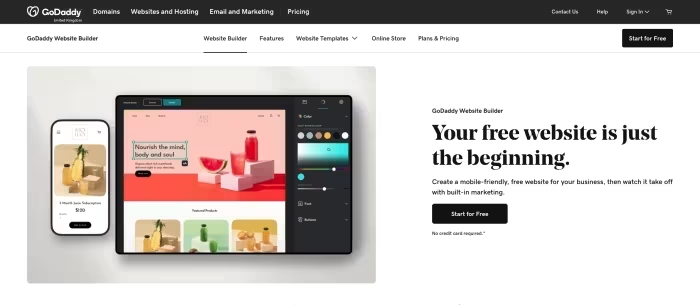
- Customization: Restricted to pre-set sections; no manual drag-and-drop
- App Marketplace: None
- Customer Support: 24/7 support available
💲 Price Range
Approximately ₹400 to ₹4,150 per month
Prices vary by region and plan (Basic to E-commerce). Note: Reviewers frequently cite steep price increases after the first year.
📊 What Reviewers Say — Feature by Feature
11 features evaluated across 11 sources.
👍 Key Strengths
- Extremely fast, intuitive setup process
- Strong built-in marketing and SEO tools
- Reliable uptime and performance
- Responsive mobile-friendly templates
- 24/7 customer support access
👎 Key Weaknesses
- Highly restrictive design and layout options
- No third-party app marketplace
- No manual drag-and-drop editing
- Steep price hikes after first year
- Generic, cookie-cutter template designs
💰 Value for Money Analysis
Reviewers consider it a cost-effective choice for entry-level business users, though many warn of significant price increases upon renewal. While it is affordable, the lack of features compared to competitors can reduce its long-term value.
9 of 11 sources commented on price or value.
🎯 Who This Product Is For
Reviewer recommendations for different target audiences and use cases.
🛠️ Best Use Cases
- Quick Business LaunchThe wizard-based setup is perfect for getting a simple, professional business presence online in hours.Great
- Mobile-First BusinessExcellent for managing simple stores or sites directly from a mobile device using the provided app.Good
- Portfolio & Creative WorkReviewers advise against this for portfolios due to the lack of creative design flexibility.Poor
🔀 Alternatives Mentioned by Reviewers
Maximise this list. Include EVERY single competitor, rival, or alternative product mentioned in any of the source reviews.
- Wix — The most frequently cited competitor. Reviewers note it offers vastly superior design flexibility, an extensive app marketplace, and more robust features, but at the cost of a steeper learning curve compared to GoDaddy.
- Squarespace — Recommended for users seeking high-end, professional aesthetics. Reviewers highlight its superior template quality and design tools, positioning it as a more professional-looking alternative for creatives.
- Hostinger — Mentioned as a more robust and feature-rich alternative that offers better value for users looking for deeper customization than GoDaddy provides.
- Duda — Cited by PCMag as a superior choice for power users due to its more robust feature sets and deeper customization options.
- Weebly — Mentioned as a classic, streamlined alternative, though GoDaddy is noted for being faster to set up and more modern in its business integrations.
- HostGator — Noted as offering more competitive pricing and unmetered storage options compared to GoDaddy’s tiered structure.
Alternatives sourced exclusively from reviewer mentions.
✅ Buy This If…
- You are a beginner with no coding experience.
- You need a professional business site launched in a matter of hours.
- You value integrated marketing tools over complex design customization.
- You need a reliable, all-in-one solution for simple store management.
❌ Skip This If…
- You require a unique, highly customized website aesthetic.
- You are a developer who needs to inject custom code.
- You plan to scale into a content-heavy or complex portfolio site.
- You are sensitive to significant price increases after the introductory period.
⚠️ Things to Check Before Buying
- Check the renewal rate, as introductory pricing increases significantly after the first year.
- Verify if your specific business needs require third-party app integrations, as GoDaddy lacks an app marketplace.
- Test the free trial (available without a credit card) to see if the section-based editor fits your workflow.
GoDaddy Website Builder is the quintessential tool for time-strapped business owners who value simplicity and speed above all else. While it is undeniably limited in creative freedom, its comprehensive marketing suite and effortless setup make it an effective, low-stress entry point for the web. If you need a functional, professional site quickly and have no need for complex design, this is an excellent choice. However, if your vision requires deep customization, you should look toward platforms like Wix or Squarespace.
Top Alternative: Wix — Choose this if you need deep design customization and a wide range of third-party app integrations.