Logitech MX Master 4 Mouse Review
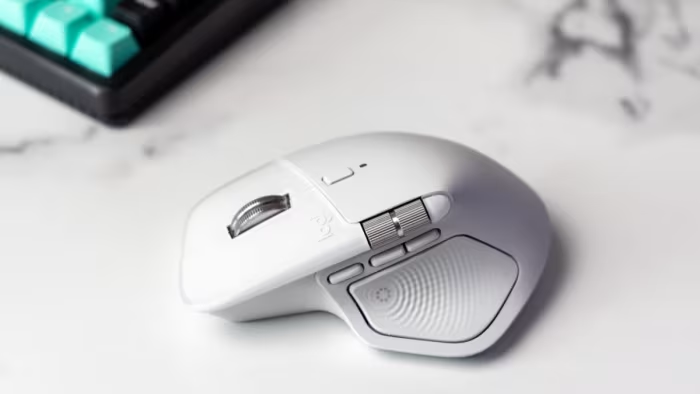
Logitech MX Master 4
A premium flagship wireless productivity mouse featuring innovative haptic feedback and enhanced ergonomic design for professional power users.
How This Score Is Calculated
- Sources analysed: 12 reviews
- Sentiment-only: 12 sources (weighted 1.0×)
- Split: 10 Positive · 2 Mixed · 0 Negative
- Raw weighted average: 8.4
- Consensus bonus +0.3: 85% agreement
- Final score: 8.4/10
Algorithmically calculated from source data. No manual adjustments.
- Most reviewed featureHaptic Feedback (12/12)
- Most praisedErgonomics
- Most criticisedWeight / Software
- Reviewer consensus levelHigh
- Value for moneyFair Value (6.5/10)
The Logitech MX Master 4 is widely regarded as the gold standard for professional productivity, building on the legacy of its predecessors with improved materials and innovative haptic feedback. While it earns praise for its exceptional ergonomics and precision, some reviewers find the new haptic features limited in software support and the mouse itself increasingly heavy. It remains the top choice for power users who prioritize long-term comfort and customizability over portability or gaming performance.
🔧 Key Specifications
- Sensor: High-precision Darkfield (works on glass)
- Connectivity: Wireless (Bolt receiver supported)
- Battery: Excellent life with fast charging
- Buttons: 6 programmable buttons, thumbwheel, Actions Ring
- Build: Durable matte plastic housing
- Weight: Heavier than previous iterations
💲 Price Range
Approximately $120 / 8,400 INR - 10,000 INR
Prices sourced from reviews. Check current retailer pricing.
📊 What Reviewers Say — Feature by Feature
Features evaluated across 12 sources.
👍 Key Strengths
- Exceptional ergonomic shape
- High-precision Darkfield sensor
- Versatile programmable buttons
- Excellent battery life
- Durable matte plastic build
👎 Key Weaknesses
- Heavy chassis
- Limited haptic software support
- High price point
- No included charging cable
- Right-handed only design
💰 Value for Money Analysis
At approximately $120, the MX Master 4 is viewed as a premium investment. While professionals who utilize the mouse for hours daily find the cost justifiable, casual users may struggle to see the value over cheaper alternatives.
8 of 12 sources commented on price or value.
⚡ Where Reviewers Disagreed
The following areas saw meaningful disagreement across sources.
- Build Materials: 5 sources praised the transition to durable matte plastic over rubber, while 3 sources criticized the loss of grip and tactile comfort compared to the MX Master 3.
🎯 Who This Product Is For
Reviewer recommendations for different target audiences and use cases.
🛠️ Best Use Cases
- Productivity & WorkflowThe Actions Ring and multiple programmable buttons allow for significant acceleration of routine software tasks.Great
- GamingThe heavy weight and sensor focus make it unsuitable for high-performance gaming.Poor
🔀 Alternatives Mentioned by Reviewers
The following products were compared directly to the MX Master 4.
- Logitech MX Master 3S — Frequently cited as the primary comparison. Reviewers note it offers similar core performance and superior grip due to its rubberized exterior, often at a better value price point. Choose this if you prefer a grippier texture and don't need the new haptic feedback.
Alternatives sourced exclusively from reviewer mentions.
🛒 Buyer's Guide
✅ Buy This If…
- You are a professional who spends many hours daily on productivity tasks.
- You require advanced customization and programmable buttons to speed up your workflow.
- You want a durable, high-precision mouse that works reliably on glass surfaces.
❌ Skip This If…
- You are a casual user who does not need complex macros.
- You are a gamer who requires a lightweight, fast-tracking mouse.
- You prefer the tactile grip of rubberized surfaces over hard matte plastic.
⚠️ Things to Check Before Buying
- Ensure your software supports the new haptic features, as compatibility is currently limited.
- Be aware that no charging cable is included in the box.
- Consider that the mouse is right-handed only; left-handed users should look elsewhere.
📈 Sentiment Trends Over Time
Reviews indicate a shift in perception regarding build materials:
- Build Quality — While the shift from rubber to matte plastic is seen as more durable, the loss of grip remains a consistent point of contention across all recent reviews.
The Logitech MX Master 4 is an excellent, refined productivity tool that holds its position as the industry leader for professionals. While the haptic feedback is currently a niche feature and the increased weight is noticeable, the overall build, sensor precision, and customization options remain unmatched. It is a highly recommended upgrade for power users seeking a reliable, long-term workstation companion.
Top Alternative: Logitech MX Master 3S — Offers a better tactile grip and similar performance for those who don't prioritize new haptic features.
PLG_CONTENT_IMAGEGALLERY_ERROR_NO_IMAGES