Malwarebytes Antivirus Review
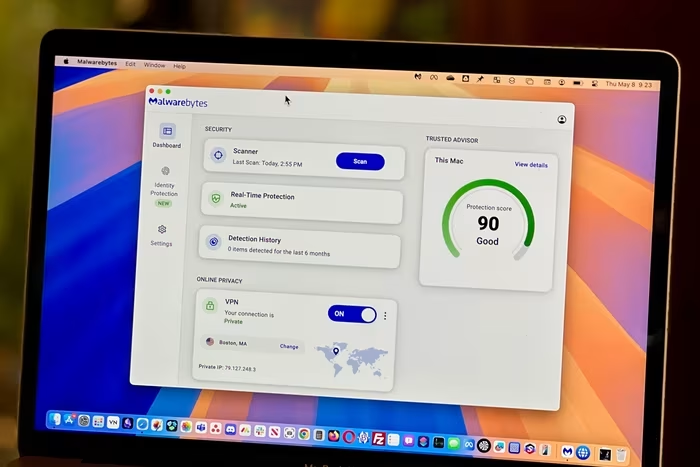
Malwarebytes Antivirus
A lightweight, user-friendly security utility focused on effective malware remediation and real-time threat detection.
How This Score Is Calculated
- Sources analysed: 8 reviews
- Sentiment-only: 8 sources (weighted 1.0×)
- Split: 4 Positive · 2 Mixed · 2 Negative
- Raw weighted average: 6.4
- Formula: Σ(score × weight) ÷ Σ(weight)
- Final score: 6.4/10 (clamped, rounded to 1 decimal)
Algorithmically calculated from source data. No manual adjustments.
- Most reviewed featureMalware Detection (8/8)
- Most praisedEase of Use
- Most criticisedLack of 3rd-party testing
- Reviewer consensus levelModerate
Malwarebytes is widely praised for its ability to hunt down persistent malware that other security suites miss, making it a highly effective secondary layer for many users. However, it suffers from a lack of independent third-party lab verification and a feature-light profile compared to full-suite competitors. While the Windows version is generally well-regarded, the Mac experience is marred by software bugs, crashes, and missing features like external volume scanning.
🔧 Key Specifications
Specifications sourced from reviewer mentions. Verify with manufacturer for complete details.
- Compatibility: Windows, macOS
- Core Features: Real-time protection, anti-exploit module, browser extension
- Bonus Features: VPN (available in Plus tier), identity protection
- Support: 24/7 support
💲 Price Range
Approximately ₹3,750 to ₹16,700 per year
Prices sourced from reviews. Check current retailer pricing.
📊 What Reviewers Say — Feature by Feature
5 features evaluated across 8 sources.
👍 Key Strengths
- Excellent malware removal capabilities
- Intuitive, user-friendly interface
- Fast initial scan speeds
- Works alongside other antivirus programs
- Consistent, transparent renewal pricing
👎 Key Weaknesses
- Lacks independent third-party lab testing
- Frequent bugs and crashes on macOS
- Missing features like built-in firewall
- VPN requires additional subscription cost
- Mac version feels like a secondary product
💰 Value for Money Analysis
Reviewers generally find the pricing to be affordable and transparent, especially compared to competitors that significantly hike prices upon renewal. However, the lack of advanced features means it may not be the best value for those seeking an all-in-one security suite.
6 of 8 sources commented on price or value.
⚡ Where Reviewers Disagreed
The following areas saw meaningful disagreement across sources.
- Detection Effectiveness: 4 sources praise its ability to catch missed threats, while 2 sources specifically note below-average detection rates compared to industry standards. The disagreement likely stems from its role as a specialized scanner versus a comprehensive, always-on antivirus suite.
🎯 Who This Product Is For
Reviewer recommendations for different target audiences and use cases.
🛠️ Best Use Cases
- Malware RemediationExcellent for cleaning up persistent viruses or malware that other antivirus software might fail to detect.Great
- Real-Time ProtectionFunctions well as a lightweight, non-intrusive shield for day-to-day browsing on Windows.Good
- Mac SecurityBest used with caution due to reported bugs and lack of external volume scanning support.OK
🔀 Alternatives Mentioned by Reviewers
- Bitdefender — Often cited as a superior, lab-tested alternative that offers more advanced features like a proprietary firewall and deep security certifications that Malwarebytes lacks. Reviewers suggest choosing this if you need a comprehensive, fully-verified security suite.
- Norton 360 — Recommended for users who prioritize deep, lab-verified security efficacy. Unlike Malwarebytes, it holds perfect scores from independent testing labs, making it a better primary antivirus solution.
- TotalAV — Mentioned as a competitor that is often cheaper but lacks the specific, specialized malware-hunting reputation that Malwarebytes holds. Choose this if budget is your primary concern over specialized remediation tools.
- Microsoft Defender — Often used as a benchmark for what Malwarebytes improves upon; reviewers note that Malwarebytes is better at catching specific security problems that Defender misses. It is the default, free baseline for Windows users.
Alternatives sourced exclusively from reviewer mentions.
🛒 Buyer's Guide
✅ Buy This If…
- You need a secondary tool to clean up malware that your primary antivirus missed.
- You value simplicity and an easy-to-use interface over complex security settings.
- You want a subscription plan without surprise price hikes at renewal.
❌ Skip This If…
- You are looking for a single, comprehensive security suite that includes a firewall and password manager.
- You are a Mac user who needs to scan external drives or requires high software stability.
- You require independent, third-party lab verification for your security software.
⚠️ Things to Check Before Buying
- Test the 14-day trial before committing, especially on macOS, to ensure the software does not crash on your specific machine.
- Check if you need a full security suite; if so, consider bundling Malwarebytes with another tool rather than using it as your sole protection.
📈 Sentiment Trends Over Time
Reviews span 2025–2026. The following changes were detected:
- Mac Experience — Remains consistently criticized for bugs and missing features compared to the Windows version throughout the 2025-2026 period.
Malwarebytes is a specialized, highly effective tool for malware remediation that shines when used as a secondary security layer. While its ease of use and consistent pricing are major wins, the software—particularly on macOS—is hampered by stability issues and a lack of independent, lab-tested verification. Most users should treat it as a powerful supplement to a more comprehensive security suite rather than a standalone replacement. If you need deep, verified protection, consider a full-suite competitor instead.
Top Alternative: Bitdefender — A fully lab-tested, comprehensive security suite that offers the deep features and certifications Malwarebytes lacks.
PLG_CONTENT_IMAGEGALLERY_ERROR_NO_IMAGES