Malwarebytes Premium Review
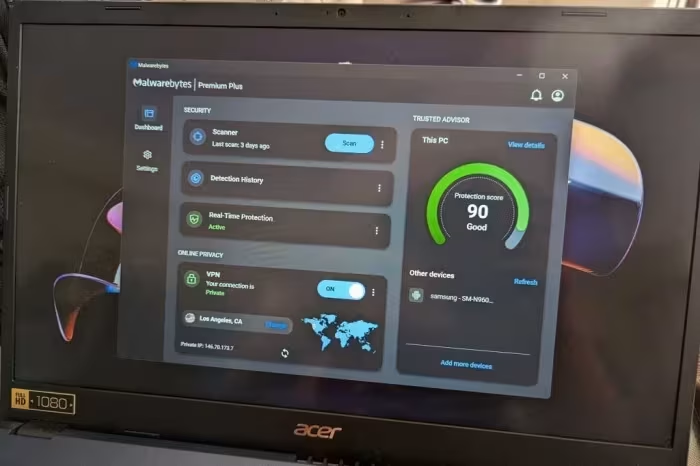
Malwarebytes Premium
A streamlined, user-friendly security utility focused on real-time malware detection, remediation, and system cleanup.
- Most reviewed featureIndependent testing (6/6)
- Most praisedScan speed
- Most criticisedLack of independent lab validation
- Reviewer consensus levelModerate
- Value for moneyFair Value (5.8/10)
Malwarebytes Premium is lauded for its clean, intuitive interface and exceptionally fast scanning performance, making it a reliable choice for users seeking basic, no-frills security. However, it faces significant criticism for its sparse feature set—often lacking firewalls, parental controls, and password managers—and a recurring lack of validation from independent security testing labs. While effective at removing malware, reviewers generally suggest that power users or those requiring comprehensive protection look toward more robust, lab-tested alternatives.
🔧 Key Specifications
Specifications sourced from reviewer mentions. Verify with manufacturer for complete details.
- Features: Real-time protection, ransomware detection, identity protection (limited), data breach reporting
- Missing Features: Firewall, parental controls, email monitoring, password manager
- Compatibility: Windows 11 (some features), macOS
- Performance: Fast installation, rapid scanning
💲 Price Range
Approximately ₹3,300 to ₹8,300 per year
Prices sourced from reviews. Check current retailer pricing.
📊 What Reviewers Say — Feature by Feature
4 features evaluated across 6 sources.
👍 Key Strengths
- Super-fast scanning performance
- Clean, simple, intuitive interface
- Effective real-time malware protection
- Reliable phishing protection scores
👎 Key Weaknesses
- No independent lab testing validation
- Missing firewall and parental controls
- Limited identity protection features
- Less comprehensive than major suites
💰 Value for Money Analysis
Reviewers generally find the pricing hard to justify given the lack of advanced features compared to broader security suites. While it is less expensive than some premium suites like Intego, it is often seen as offering less value than competitors that include more tools for a similar price.
6 of 6 sources commented on price or value.
⚡ Where Reviewers Disagreed
The following areas saw meaningful disagreement across sources.
- System Resource Impact: 2 sources praised its low impact on system resources, while 1 source explicitly cited a large system impact. This suggests performance may vary significantly based on user configuration or platform.
🎯 Who This Product Is For
Reviewer recommendations for different target audiences and use cases.
🛠️ Best Use Cases
- Malware RemovalHighly effective at eradicating existing malware infections and providing real-time prevention.Great
- Phishing ProtectionDemonstrates very good efficacy in blocking malicious and fraudulent websites.Good
- System CleanupWell-regarded for its fast, reliable utility in identifying and cleaning up unwanted files.Great
🔀 Alternatives Mentioned by Reviewers
- Bitdefender Antivirus Plus / Bitdefender: A preferred Editors' Choice winner, noted for holding perfect scores from independent labs and offering a deeper, more advanced feature set than Malwarebytes. Choose this if you prioritize third-party verification and comprehensive security tools.
- Norton AntiVirus Plus / Norton 360: Frequently cited as a superior alternative due to its robust feature set and perfect lab testing scores. Recommended for users who need a more complete security suite.
- Sophos: Mentioned as a more affordable alternative, though it is compared in the context of suite comprehensiveness.
- Intego: Noted as a more expensive alternative for Mac, often compared when discussing the price-to-feature ratio of security suites.
- Kaspersky: Cited as a competitor offering more comprehensive features like parental controls and email monitoring.
- Avast: Mentioned as a competitor that provides a more comprehensive range of features than the bare-bones Malwarebytes offering.
Alternatives sourced exclusively from reviewer mentions.
🛒 Buyer's Guide
✅ Buy This If…
- You prioritize a simple, clean, and easy-to-use interface.
- You need a fast, reliable tool for scanning and removing malware.
- You are a casual user who does not require complex security features like firewalls.
❌ Skip This If…
- You require validation from independent security testing labs.
- You need a comprehensive security suite including firewalls and parental controls.
- You are a power user who expects advanced, deep-level configuration options.
⚠️ Things to Check Before Buying
- Check if the specific version you are purchasing (Windows vs. Mac) includes the tools you need, as some features are platform-limited.
- Note the lack of independent lab test results when comparing against other industry-standard antivirus software.
📈 Sentiment Trends Over Time
Reviews span 2025 and earlier. The following changes were detected:
- Feature Set — Consistently described as bare-bones throughout recent reviews, with minimal expansion into deeper suite functionality.
Malwarebytes Premium is a fast, effective, and user-friendly tool for malware remediation and basic protection, but it falls short of being a complete security solution. Its lack of independent laboratory validation and missing utility features make it difficult to recommend over more comprehensive, battle-tested competitors. It is best suited for casual users who prioritize speed and simplicity over advanced security bells and whistles. For those seeking maximum protection and verified efficacy, alternatives like Bitdefender or Norton are the superior choices.
Top Alternative: Bitdefender — Offers perfect independent lab scores and a more comprehensive suite of features at a competitive value.
PLG_CONTENT_IMAGEGALLERY_ERROR_NO_IMAGES