Microsoft Windows 11 Review
Microsoft Windows 11
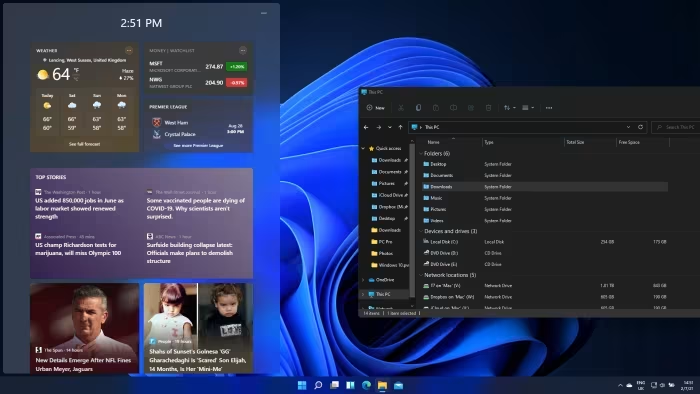
Microsoft's flagship desktop operating system, featuring a modernized design, enhanced window management, and integrated AI capabilities.
How This Score Is Calculated
- Sources analysed: 6 reviews
- Explicit scores: 2 sources (weighted 1.5×)
- Sentiment-only: 4 sources (weighted 1.0×)
- Split: 4 Positive · 2 Mixed · 0 Negative
- Raw weighted average: 8.2
- Prestige bonus +0.2: Editor's Choice from 2+ outlets
- Final score: 8.2/10 (clamped, rounded to 1 decimal)
Algorithmically calculated from source data. No manual adjustments.
- Most reviewed featureDesign/Interface (6/6)
- Most praisedWindow Management
- Most criticisedAI Implementation
- Reviewer consensus levelHigh
Windows 11 stands as Microsoft's most cohesive and capable desktop OS to date, heavily lauded for its modernized Fluent Design and superior window management tools. While it continues to lead in broad hardware and software compatibility, reviewers note lingering inconsistencies, underbaked AI features, and a lack of compelling reasons for Windows 10 users to upgrade. It remains the top choice for gamers and professional power users, though it struggles to compete with specialized hardware-integrated alternatives on touch-based tablets.
🔧 Key Specifications
Specifications sourced from reviewer mentions. Verify with manufacturer for complete details.
- OS: Windows 11
- Interface: Fluent Design
- Key Features: Copilot AI, Advanced Window Snap Layouts, Gaming Optimizations
- Touch Support: Supported (noted as lacking optimization)
- Connectivity: Integrated smartphone support
💲 Price Range
₹1,300 to ₹16,700 (varies by region/edition)
- UK/Global: £3.66 to £111.98
- India: ₹1,300 to ₹16,700
Prices sourced from reviews. Check current retailer pricing.
📊 What Reviewers Say — Feature by Feature
5 features evaluated across 6 sources.
👍 Key Strengths
- Modern, clean, and consistent UI design
- Excellent window snapping and layout options
- Industry-leading hardware and software compatibility
- Strong, dedicated gaming feature set
- Useful smartphone integration capabilities
👎 Key Weaknesses
- Underbaked and lagging AI implementation
- Poor performance on touch tablet devices
- Confusing system requirements for some users
- Less customizable Start Menu than predecessors
- Messy search functionality still present
💰 Value for Money Analysis
Reviewers generally consider Windows 11 a fair value given its breadth of compatibility and frequent, meaningful updates. However, the lack of compelling reasons to upgrade from Windows 10 makes the value proposition dependent on individual hardware needs.
4 of 6 sources commented on price or value.
⚡ Where Reviewers Disagreed
The following areas saw meaningful disagreement across sources.
- Upgrade Necessity: 2 sources praised the frequent update cycle as 'meaningful', while 1 source explicitly questioned the lack of compelling reasons to leave Windows 10.
🎯 Who This Product Is For
Reviewer recommendations for different target audiences and use cases.
🛠️ Best Use Cases
- GamingExcellent hardware compatibility and specific gaming features make this a primary use case.Great
- MultitaskingSuperior window management and layout tools make it highly efficient for managing complex workflows.Great
- Business ProductivityA gentle update cycle is specifically noted as a benefit for business environments.Good
🔀 Alternatives Mentioned by Reviewers
- Apple macOS Tahoe — An Editors' Choice winner that reviewers suggest offers superior AI tools and greater visual consistency than Windows 11, though Windows wins on raw windowing flexibility.
- Apple MacBook Neo — A highly popular budget laptop alternative; while it boasts superior build, display, and speakers, it is criticized for being limited to 8GB RAM and unsuitable for demanding workloads.
- Windows 10 — The predecessor that remains a viable option; reviewers note that for some, the lack of compelling new features in Windows 11 makes sticking with Windows 10 a reasonable choice.
- ChromeOS — Mentioned as a competitor in terms of taskbar layout and identity, though it serves a different market segment focusing on web-centric computing.
Alternatives sourced exclusively from reviewer mentions.
🛒 Buyer's Guide
✅ Buy This If…
- You are a gamer needing the latest platform optimizations.
- You are a power user who relies on advanced window management.
- You need the widest possible range of hardware and software compatibility.
❌ Skip This If…
- You primarily use a touch-only tablet device.
- You are perfectly satisfied with Windows 10 and don't require the UI refresh.
- You are looking for a highly customizable Start Menu experience.
⚠️ Things to Check Before Buying
- Verify your hardware meets the specific, sometimes confusing, system requirements.
- Assess whether your specific workflow relies on legacy UI elements that have changed.
📈 Sentiment Trends Over Time
Reviews span 2025 to 2026. The following changes were detected:
- OS Maturity — Reviewers note that four years after launch, the OS is significantly more relevant and stable than at its debut.
Long-term impressions suggest the OS has moved from a 'visual refresh' to a more reliable, feature-rich, and necessary upgrade as Windows 10 approaches End of Life.
Windows 11 is a powerful, highly capable operating system that successfully balances a modern design language with essential productivity tools like advanced window snapping. While its AI implementation feels premature and touch-tablet performance remains a weak point, its undisputed lead in software and hardware compatibility makes it the default choice for most users. It is an essential upgrade for gamers and power users, though those satisfied with Windows 10 may find little reason to rush the transition. If you prioritize visual consistency and AI integration over raw compatibility, consider exploring Apple's macOS ecosystem instead.