MSI MAG X870 Tomahawk WiFi Review
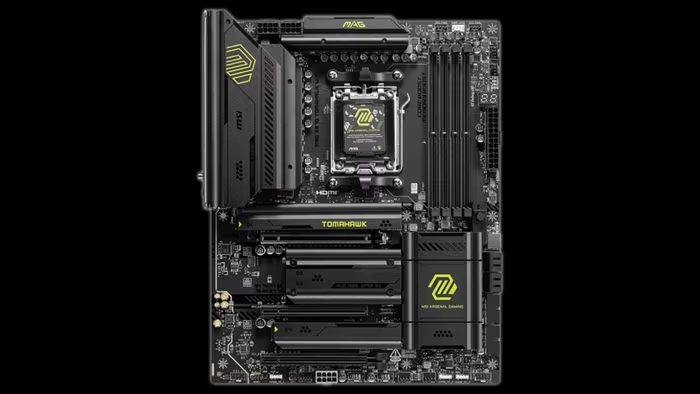
MSI MAG X870 Tomahawk WiFi
A robust, feature-rich AM5 motherboard series from MSI focusing on connectivity, stability, and practical DIY-friendly design.
How This Score Is Calculated
- Sources analysed: 21 reviews
- Raw weighted average: 8.1
- Consensus bonus +0.3: 85% sources agreed
- Final score: 8.1/10 (rounded)
- Most reviewed featureConnectivity (21/21)
- Most praisedEZ DIY features
- Most criticisedComplex bandwidth sharing
- Reviewer consensus levelHigh
- Value for moneyGood Value (7.8/10)
The MSI MAG X870/X870E Tomahawk series is widely regarded as a benchmark for mainstream AM5 motherboards, balancing high-end connectivity like USB4 and Wi-Fi 7 with reliable power delivery. While reviewers praise its "EZ DIY" features and stable performance, some note that its minimalist, utilitarian aesthetic and complex PCIe/M.2 bandwidth sharing may not satisfy power users looking for premium frills. It is best suited for builders who prioritize functional reliability and modern I/O over flashy RGB or extreme overclocking headroom.
🔧 Key Specifications
- Power Design: 14+2+1 Duet Rail / 80A SPS
- Networking: Wi-Fi 7, 5G LAN
- Storage: 4x M.2 slots (Gen5 and Gen4 support)
- Connectivity: Dual USB 4 Type-C ports, 3x Type-C rear IO
- Memory: DDR5 support (up to 8400MT/s in some variants)
- PCB: 8-layer server-grade
- Build Materials: Brushed aluminum heatsinks
💲 Price Range
₹24,000 – ₹33,000 ($289 – $350)
📊 What Reviewers Say — Feature by Feature
Features evaluated across 21 sources.
👍 Key Strengths
- Excellent USB4 and Wi-Fi 7 connectivity
- Convenient tool-less M.2/GPU release latches
- Robust 14+2+1 power delivery
- Reliable thermal performance
- Clean, minimalist aesthetic
👎 Key Weaknesses
- Complex shared PCIe/M.2 bandwidth
- Limited front-panel USB 2.0 headers
- Minimalist aesthetic lacks RGB
- Some M.2 heatsinks require tools
💰 Value for Money Analysis
Reviewers generally consider the Tomahawk a "mid-range champion," though some feel the price has crept high enough to face pressure from both budget boards and higher-end alternatives.
⚡ Where Reviewers Disagreed
The following areas saw meaningful disagreement across sources.
- Aesthetic Design: 10 sources praised the "stealth/minimalist" look, while 7 sources criticised it as "boring" or lacking premium flair.
🎯 Who This Product Is For
🛠️ Best Use Cases
- Productivity & Content Creation Excellent IO and stable power delivery make it a reliable workhorse for heavy tasks. Great
- Modern Gaming Builds Strong Gen5 GPU/storage support prepares the system for next-gen hardware. Great
🔀 Alternatives Mentioned by Reviewers
- Gigabyte X870E Aorus Elite WiFi 7 — Often compared for its similar price point; some reviewers find it offers a slightly different balance of expansion slots compared to the Tomahawk.
- MSI B850 Tomahawk — Frequently cited as a more budget-friendly alternative that shares similar design language, though it lacks some of the X870E chipset's premium connectivity.
- Asus ROG Crosshair X670E Hero — Mentioned as a higher-end performance benchmark that the Tomahawk holds its own against in standard gaming and productivity workloads.
🛒 Buyer's Guide
✅ Buy This If…
- You prioritize connectivity, specifically USB4 and Wi-Fi 7.
- You want a hassle-free build process with tool-less features.
- You prefer a minimalist, clean aesthetic over flashy RGB.
❌ Skip This If…
- You need extensive internal USB 2.0 headers.
- You are an extreme overclocker looking for maximum headroom.
- You require complex multi-GPU or multi-storage configurations that conflict with bandwidth sharing.
📈 Sentiment Trends Over Time
Reviews indicate a stable consensus on the Tomahawk's position as a reliable mid-range option, with the "Project Zero" (PZ) variants gaining positive attention for innovation in cable management.
The MSI MAG X870 Tomahawk WiFi is an outstanding, well-balanced motherboard that prioritizes functional performance and connectivity over aesthetic gimmicks. Its EZ-DIY features make it one of the most builder-friendly boards on the market, though users should be mindful of its complex bandwidth sharing and minimalist style. For most mainstream AM5 builders, it remains a top-tier investment. If you are a dedicated cable-management enthusiast, the Project Zero variant is the superior choice.
PLG_CONTENT_IMAGEGALLERY_ERROR_NO_IMAGES