OWC Envoy Ultra Review
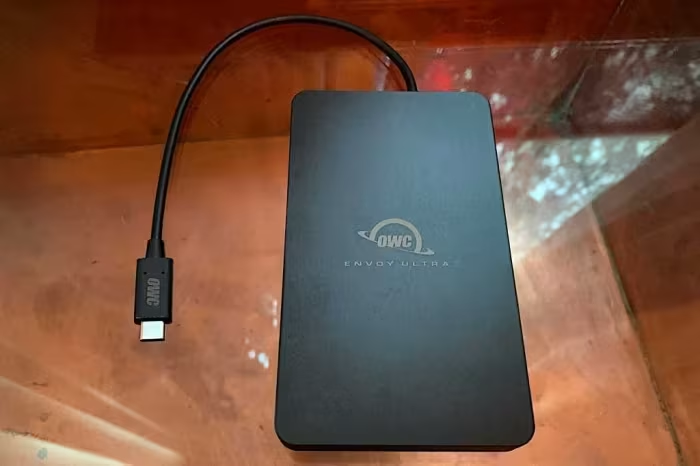
OWC Envoy Ultra
A premium, rugged Thunderbolt 5 portable SSD designed for professional creatives needing industry-leading transfer speeds.
How This Score Is Calculated
- Sources analysed: 7 reviews
- Raw weighted average: 7.9/10
- Formula: Σ(score × weight) ÷ Σ(weight)
- Final score: 7.9/10 (clamped, rounded to 1 decimal)
Algorithmically calculated from source data. No manual adjustments.
- Most reviewed featurePerformance (7/7)
- Most praisedThunderbolt 5 Speeds
- Most criticisedCaptive Cable
- Reviewer consensus levelHigh
- Value for moneyFair Value (6.0/10)
The OWC Envoy Ultra is a high-performance external SSD that sets a new bar for transfer speeds by utilizing the 80 Gbps Thunderbolt 5 interface. While it delivers blistering read speeds exceeding 6GB/s, it is a specialized tool that requires modern, high-end hardware to achieve its full potential. Professionals will appreciate its rugged, IP67-rated build, though the non-detachable cable and premium price point make it a niche choice for most casual users.
🔧 Key Specifications
- Interface: Thunderbolt 5 (80 Gbps)
- Read Speed: Up to 6000+ MB/s
- Write Speed: Up to 5000 MB/s
- Build: Aluminium, IP67 dust/water resistant
- Cooling: Passive/Fanless
- Warranty: 5-year
- Cable: Fixed/Captive (9-inch)
💲 Price Range
Approx. ₹27,500 to ₹54,500
Prices sourced from reviews. Check current retailer pricing.
📊 What Reviewers Say — Feature by Feature
7 features evaluated across 7 sources.
👍 Key Strengths
- Blistering 6000MB/s+ Thunderbolt 5 speeds
- Rugged IP67 water and dust resistance
- Silent, fanless thermal management
- User-replaceable internal M.2 NVMe SSD
- Generous five-year product warranty
👎 Key Weaknesses
- Very high price point
- Non-detachable, fixed captive cable
- Bulky and heavy for pocket carry
- Limited compatibility with older hardware
- Low sustained write performance
💰 Value for Money Analysis
While expensive compared to standard USB or Thunderbolt 3 drives, it is considered a bargain compared to the cost of Apple's internal storage upgrades. The premium is justified only for professionals who truly require the 80 Gbps bandwidth.
7 of 7 sources commented on price or value.
⚡ Where Reviewers Disagreed
The following areas saw meaningful disagreement across sources.
- Compatibility: Some sources laud its backward compatibility, while others warn it is limited with older hardware and may not mount on certain bus-powered configurations.
🎯 Who This Product Is For
Reviewer recommendations for different target audiences and use cases.
🛠️ Best Use Cases
- 4K/8K Video EditingThe massive read speeds ensure zero latency when scrubbing through high-bitrate footage.Great
- Data TransferIdeal for offloading large project files rapidly between workstations.Great
- Field ProductionRugged design and water resistance make it suitable for harsh outdoor environments.Good
🔀 Alternatives Mentioned by Reviewers
Maximise this list. Include EVERY single competitor, rival, or alternative product mentioned in any of the source reviews.
- OWC Express 1M2 — A 40 Gbps alternative that is significantly slower (nearly 44% slower in sequential reads) but serves as a more affordable, lower-tier option within the OWC ecosystem.
- LaCie Rugged SSD Pro — Cited as a direct competitor for field work; while it offers ruggedness, it is specifically compared as being physically smaller and lighter than the Envoy Ultra.
- Apple Internal Storage — Frequently referenced as the benchmark for speed; the Envoy Ultra is recommended as a cheaper alternative for expanding capacity compared to Apple's premium internal upgrade pricing.
Alternatives sourced exclusively from reviewer mentions.
🛒 Buyer's Guide
✅ Buy This If…
- You own a Thunderbolt 5-compatible Mac or PC.
- You are a creative professional working with massive high-resolution video files.
- You need a rugged, water-resistant drive for field use.
- You want a user-serviceable drive that allows for future M.2 upgrades.
❌ Skip This If…
- You are a casual user with older hardware (you won't see the speed benefits).
- You need a compact, pocketable drive with a replaceable cable.
- You have a tight budget, as standard USB 3.2 SSDs are significantly cheaper.
⚠️ Things to Check Before Buying
- Ensure your computer supports Thunderbolt 5 (required for full 80Gbps speed).
- Note that the cable is non-detachable and may be a point of failure.
- Windows users may need to reformat the drive for optimal performance.
📈 Sentiment Trends Over Time
Reviews reflect a consistent consensus regarding its performance, though long-term concerns regarding the captive cable have emerged since launch.
- Performance — Remains the industry leader in speed across all tested reviews.
The OWC Envoy Ultra is an uncompromising, high-speed storage solution for professionals who need the absolute best performance currently available. While its captive cable and premium price are significant drawbacks, its rugged build and modular M.2 design provide excellent longevity. It is a must-have for Thunderbolt 5-equipped workstations, but overkill for most others. If you don't need 80Gbps speeds, consider a standard Thunderbolt 4 or high-end USB 3.2 drive instead.
PLG_CONTENT_IMAGEGALLERY_ERROR_NO_IMAGES