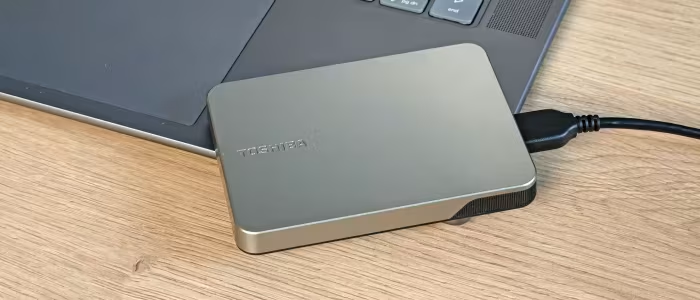
Toshiba Canvio Flex Review
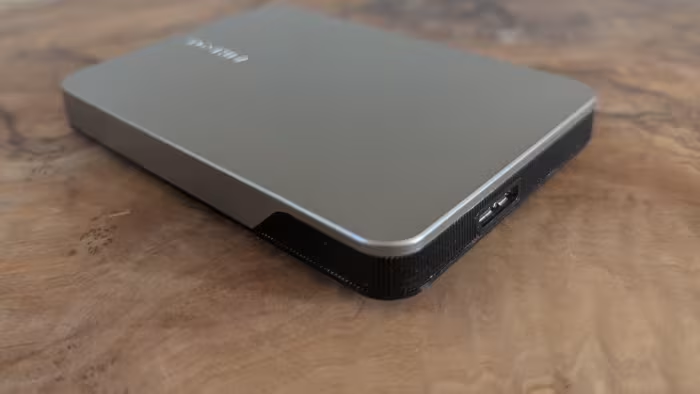
Toshiba Canvio Flex
A versatile, budget-friendly portable hard drive designed for high-capacity storage and cross-platform compatibility.
How This Score Is Calculated
- Sources analysed: 8 reviews
- Explicit scores: 0 sources (weighted 1.5×)
- Sentiment-only: 8 sources (weighted 1.0×)
- Split: 5 Positive · 3 Mixed · 0 Negative
- Raw weighted average: 7.4
- Formula: Σ(score × weight) ÷ Σ(weight)
- Review period: 2025
- Value sources: 8 of 8 mentioned price or value
- Final score: 7.4/10 (clamped, rounded to 1 decimal)
Algorithmically calculated from source data. No manual adjustments.
- Most reviewed featureValue for Money (8/8)
- Most praisedCross-platform compatibility
- Most criticisedMicro-B interface
- Reviewer consensus levelHigh
- Value for moneyExcellent Value (8.2/10)
The Toshiba Canvio Flex is a reliable, high-capacity mechanical hard drive that earns praise for its exceptional value and seamless cross-platform compatibility across PC, Mac, and tablets. While reviewers highlight its solid build quality and inclusion of both USB-C and USB-A cables, they caution that it is significantly slower than modern portable SSDs and relies on an dated Micro-B connector. It remains an ideal, cost-effective solution for users prioritizing storage volume over raw transfer speed.
🔧 Key Specifications
Specifications sourced from reviewer mentions. Verify with manufacturer for complete details.
- Storage Capacity: Up to 2TB
- Interface: USB 3.1 (via Micro-B connector)
- Cables: USB Type-A and Type-C included
- Compatibility: PC, Mac, Tablets
- Warranty: 3 Years
- Build: Compact and lightweight
💲 Price Range
Approx. ₹5,100 to ₹12,900
Prices sourced from reviews. Check current retailer pricing.
📊 What Reviewers Say — Feature by Feature
5 features evaluated across 8 sources.
👍 Key Strengths
- Excellent value for money
- Broad cross-platform compatibility
- Solid, high-quality build
- 3-year warranty included
- USB-C and USB-A cables included
👎 Key Weaknesses
- Slow compared to SSDs
- Outdated Micro-B connector
- No bundled management software
- Slow random read/write speeds
💰 Value for Money Analysis
Reviewers widely agree that the Canvio Flex offers one of the best price-per-gigabyte ratios on the market. It is specifically recommended for budget-conscious users who need high-capacity storage for backups and don't require the blistering speeds of a premium SSD.
8 of 8 sources commented on price or value.
⚡ Where Reviewers Disagreed
The following areas saw meaningful disagreement across sources.
- Performance Expectations: 5 sources view it as 'decent' for its class, while 3 sources emphasize its limitations as a 'significant' drawback compared to modern standards. The disagreement hinges on whether the user's primary need is high-speed data movement (where it fails) or simple, cost-effective backup (where it succeeds).
🎯 Who This Product Is For
Reviewer recommendations for different target audiences and use cases.
🛠️ Best Use Cases
- BackupsExcellent capacity-to-price ratio makes it a reliable choice for long-term data preservation.Great
- Cross-Platform Media StorageWorks seamlessly across PC, Mac, and tablets, making it great for shared media libraries.Great
- Large File TransferMechanical nature and Micro-B interface make it slow for high-speed, high-volume file transfers.Poor
🔀 Alternatives Mentioned by Reviewers
- Portable SSDs (General Category) — Reviewers almost universally position these as the primary alternative. They offer vastly superior speed and durability but come at a higher price point. Choose an SSD if speed is your priority; choose the Canvio Flex if capacity-per-dollar is your priority.
- Seagate One Touch — Mentioned as a direct competitor in the mechanical HDD space. The Canvio Flex is noted to perform slightly faster in some scenarios, though they are largely comparable in utility.
- LaCie Mobile Drive — Another mechanical alternative cited. The Canvio Flex is noted as being slightly faster, though LaCie is often associated with premium design.
- Seagate Portable 2TB — Noted as being cheaper than the Canvio Flex, but the Canvio Flex is generally preferred for its better warranty and more convenient Type-C connectivity.
- Western Digital MyPassport Series — Cited as a strong competitor that often features more aggressive pricing and includes bundled management software, which the Canvio Flex lacks.
Alternatives sourced exclusively from reviewer mentions.
🛒 Buyer's Guide
✅ Buy This If…
- You need high-capacity storage for backups and documents.
- You are on a tight budget and prioritize price per GB.
- You require a drive that works easily across Windows, Mac, and tablets.
❌ Skip This If…
- You need high-speed transfers for video editing or large files.
- You are looking for the ruggedness and performance of an SSD.
- You require advanced data encryption or bundled management software.
⚠️ Things to Check Before Buying
- Verify that your primary use case is backup and not high-speed data transfer.
- Be aware of the Micro-B interface, which may feel outdated compared to modern USB-C standards.
📈 Sentiment Trends Over Time
Reviews span 2025. The following changes were detected:
- Performance — The 2025 version is noted to be slightly faster than previous iterations, though it still falls behind SSDs.
The Toshiba Canvio Flex is a dependable, cost-effective workhorse that excels at basic storage and backup duties. While its mechanical architecture and aging Micro-B interface limit it compared to modern SSDs, its broad compatibility and excellent price-per-gigabyte make it a smart choice for budget-conscious users. If your priority is large capacity for a low price, this is an excellent pick. Otherwise, consider a portable SSD for faster performance.
Top Alternative: Portable SSDs — Choose an SSD if you prioritize speed and ruggedness over maximum storage capacity.