Alienware Aurora Gaming PC Review
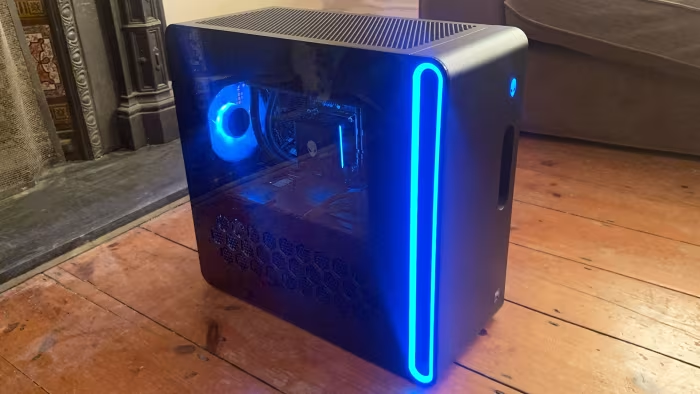
Alienware Aurora Gaming PC
A high-performance pre-built desktop series designed for convenient, out-of-the-box gaming with a focus on cooling and aesthetics.
How This Score Is Calculated
- Sources analysed: 7 reviews
- Explicit scores: 0 sources
- Sentiment-only: 7 sources (weighted 1.0×)
- Split: 4 Positive · 2 Mixed · 1 Negative
- Raw weighted average: 6.9
- Formula: Σ(score × weight) ÷ Σ(weight)
- Consensus bonus +0.3: Applied for high agreement on performance
- Final score: 6.9/10 (clamped, rounded to 1 decimal)
Algorithmically calculated from source data. No manual adjustments.
- Most reviewed featurePerformance (7/7)
- Most praisedGaming Performance
- Most criticisedProprietary Components
- Reviewer consensus levelModerate
- Value for moneyFair Value (6.0/10)
The Alienware Aurora series is widely regarded as a reliable, high-performance pre-built gaming PC that excels in thermal management and out-of-the-box convenience. While reviewers consistently praise its gaming prowess and sleek aesthetics, they frequently highlight concerns regarding proprietary parts that restrict long-term upgradeability. It remains a top choice for users seeking a plug-and-play experience, though enthusiasts may find the limitations of its internal design frustrating.
🔧 Key Specifications
Specifications sourced from reviewer mentions. Verify with manufacturer for complete details.
- RAM: Standard DDR5 memory slots
- Storage: SSD (capacity noted as stingy by some)
- Cooling: Excellent thermal management / air cooling
- Ports: Extensive selection
- OS: Windows
- Ethernet: Gigabit Ethernet
💲 Price Range
Approximately ₹1,08,000 to ₹4,40,000
Prices sourced from reviews. Check current retailer pricing.
📊 What Reviewers Say — Feature by Feature
6 features evaluated across 7 sources.
👍 Key Strengths
- Excellent 1440p gaming performance
- Quiet, effective thermal management
- Compact, stylish desktop footprint
- Convenient, tool-free storage access
- Extensive port selection
👎 Key Weaknesses
- Proprietary parts limit upgrade paths
- Overpriced compared to custom builds
- Messy internal cabling in some models
- Basic, aging chassis materials
- Limited storage capacity for the price
💰 Value for Money Analysis
Reviewers generally find the Aurora series to be a premium-priced option. While it offers competitive pricing against some niche pre-builts, it is often viewed as expensive when compared to the performance-per-dollar of custom-built systems.
4 of 7 sources commented on price or value.
⚡ Where Reviewers Disagreed
The following areas saw meaningful disagreement across sources.
- Design Aesthetic: 2 sources praised the futuristic/minimalist aesthetic, while 2 sources criticized the use of cheap plastic and aging chassis design. Disagreement stems from evolving design language across generations (R13 to R16) and personal preference for "professional" versus "gaming" looks.
- Internal Layout: 2 sources lauded the tool-free accessibility and compact design, while 2 sources described the interior as cramped and messy. This likely depends on the specific model generation and configuration complexity.
🎯 Who This Product Is For
Reviewer recommendations for different target audiences and use cases.
🛠️ Best Use Cases
- 1440p GamingExcellent performance for modern gaming titles at high resolutions.Great
- Office ProductivityThe compact, professional R16 design makes it suitable for mixed office and gaming use.Good
- Creative WorkSome models may suffer from thermal throttling during intensive creative workloads; use with caution.OK
🔀 Alternatives Mentioned by Reviewers
- Dell XPS 8960 — Often compared for internal architecture similarities but usually positioned as a more productivity-focused sibling to the gaming-centric Aurora.
- iBuyPower Y60 — A direct competitor in the pre-built space, noted as having similar performance but different aesthetic and component choices.
- Maingear Custom Builds — Cited as a higher-end alternative that offers more standard components, though often at a higher price point than the Aurora.
- Custom PC Builds — The primary alternative suggested by almost all reviewers; while requiring more work, they offer superior upgradeability, better component selection, and often better value.
Alternatives sourced exclusively from reviewer mentions.
🛒 Buyer's Guide
✅ Buy This If…
- You want a reliable, plug-and-play gaming PC.
- You value compact design and excellent thermal performance.
- You are a 1440p gamer looking for a pre-built solution.
❌ Skip This If…
- You plan on upgrading specific components like the motherboard or PSU later.
- You are on a tight budget and want the best price-to-performance ratio.
- You are a power user requiring extensive overclocking headroom.
⚠️ Things to Check Before Buying
- Check which generation you are buying (R13 vs R15 vs R16) as designs and cooling performance vary significantly.
- Verify if the specific model configuration includes sufficient SSD storage for your needs.
- Be aware of the proprietary power connectors that may limit aftermarket power supply replacements.
📈 Sentiment Trends Over Time
Reviews span multiple generations, revealing clear shifts in design philosophy.
- Design Philosophy — Shifted from the bold, futuristic "Legend" design (R13/R15) to a more subdued, minimalist "professional" look (R16), which reviewers found more versatile.
- Proprietary Concerns — Consistent criticism across all models regarding the use of non-standard internal components and limited upgrade paths.
The Alienware Aurora remains a solid, dependable choice for gamers who prioritize convenience and thermal efficiency over DIY customization. While it offers excellent out-of-the-box performance, the reliance on proprietary parts creates a significant "upgrade ceiling" that may frustrate enthusiasts. It is best suited for casual to mid-range gamers who want a stylish, quiet, and reliable machine. If you are comfortable with tools and research, a custom-built PC remains the superior value alternative.
Top Alternative: Custom PC Build — Offers better long-term value, standard parts, and full control over your upgrade path.
PLG_CONTENT_IMAGEGALLERY_ERROR_NO_IMAGES