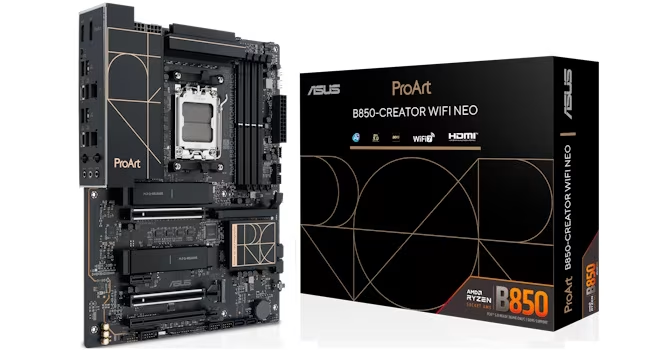
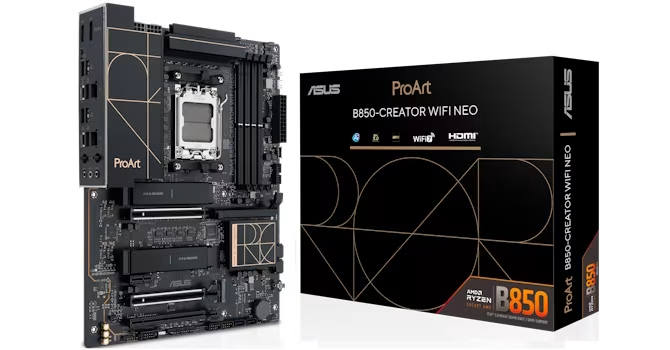
ASUS ProArt B850-Creator Wi-Fi Neo Review
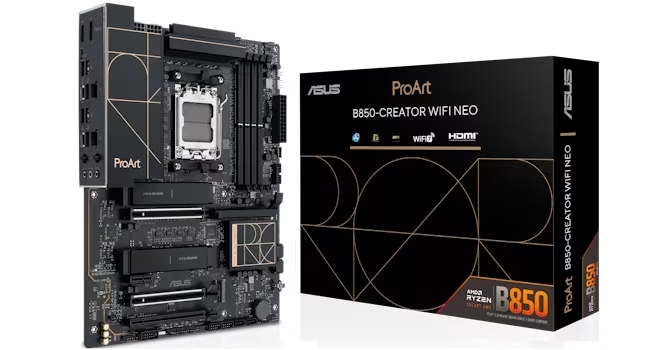
ASUS ProArt B850-Creator Wi-Fi Neo
A workstation-focused motherboard offering robust power delivery and dual PCIe Gen 5 M.2 support at a mid-range price point.
How This Score Is Calculated
- Sources analysed: 5 reviews
- Explicit scores: 0 sources
- Sentiment-only: 5 sources (weighted 1.0×)
- Split: 3 Positive · 1 Mixed · 1 Negative
- Raw weighted average: 7.2
- Formula: Σ(score × weight) ÷ Σ(weight)
- Final score: 7.2/10 (clamped, rounded to 1 decimal)
Algorithmically calculated from source data. No manual adjustments.
- Most reviewed featureThermal Management (2/5)
- Most praisedPCIe Gen 5 M.2 Support
- Most criticisedLack of Thunderbolt/USB4
- Reviewer consensus levelModerate
The ASUS ProArt B850-Creator Wi-Fi Neo is a stylish, feature-rich motherboard designed for workstation users who prioritize PCIe Gen 5 storage speeds over high-end connectivity like Thunderbolt. While it excels in power delivery and aesthetic design, it is limited by a sparse rear I/O and thermal management that requires manual attention under heavy loads. It represents a compelling alternative to flagship boards for users who need specific professional features without the premium cost.
🔧 Key Specifications
Specifications sourced from reviewer mentions. Verify with manufacturer for complete details.
- Power Delivery: 36W per fan header
- Storage: Dual PCIe Gen 5 M.2 slots
- USB Charging: 30W USB-C PD/QC4+
- BIOS: 512 Mbit
- Connectivity: Wi-Fi included (Wi-Fi Neo)
💲 Price Range
Approx. 25,000 INR
Prices sourced from reviews. Check current retailer pricing.
📊 What Reviewers Say — Feature by Feature
5 features evaluated across 5 sources.
👍 Key Strengths
- Dual PCIe Gen 5 M.2 support
- Strong 36W fan header power
- 30W USB-C PD/QC4+ fast charging
- Stylish ProArt aesthetic design
- Upgraded 512 Mbit BIOS
👎 Key Weaknesses
- No Thunderbolt or USB4 connectivity
- Limited rear I/O Type-A ports
- Small heatsinks struggle under heavy load
- Bloatware-heavy Armory Crate software
- Unintuitive EFI/BIOS navigation
💰 Value for Money Analysis
Reviewers view this as a 'budget-friendly' workstation option that avoids the high price points of flagship X870E or Z890 motherboards. While it is considered a premium-priced B850 board, it delivers enough professional-grade features to justify the cost for the target audience.
2 of 5 sources commented on price or value.
⚡ Where Reviewers Disagreed
The following areas saw meaningful disagreement across sources.
- BIOS/EFI Usability: 2 sources praised the granular Q-Fan control while 1 source criticized the unintuitive navigation and inefficient workflow, suggesting a split between feature depth and user experience.
🎯 Who This Product Is For
Reviewer recommendations for different target audiences and use cases.
🛠️ Best Use Cases
- High-Speed Storage WorkflowsExcellent for users leveraging dual PCIe Gen 5 M.2 SSDs, provided manual thermal pad adjustments are made.Great
- Workstation BuildsGood for building a professional rig on a budget, though rear I/O limitations may hinder peripheral-heavy setups.Good
🔀 Alternatives Mentioned by Reviewers
- ASUS X870E Motherboards — These represent the flagship tier; they offer superior high-end connectivity features compared to the B850-Creator but at a significantly higher price point.
- MSI Motherboards — Noted for having a different EFI/BIOS implementation, specifically regarding fan curve customization, which some reviewers found more efficient than the ASUS ProArt implementation.
Alternatives sourced exclusively from reviewer mentions.
🛒 Buyer's Guide
✅ Buy This If…
- You need dual PCIe Gen 5 M.2 slots for professional storage workflows.
- You want a stylish workstation aesthetic without paying flagship X870E/Z890 prices.
- You require robust fan control and high-power fan headers.
❌ Skip This If…
- You rely on Thunderbolt or USB4 for professional peripherals.
- You need a large number of rear I/O Type-A ports.
- You are unwilling to manually adjust thermal pads for M.2 drives.
⚠️ Things to Check Before Buying
- Verify that your M.2 thermal requirements are met by the included heatsinks, as they may struggle with back-to-back heavy loads.
- Be prepared to manage the installation of ASUS Armory Crate, which is described as bloatware-prone.
📈 Sentiment Trends Over Time
Reviews span recent testing cycles. The following changes were detected:
- Software/BIOS — The transition to a 512 Mbit BIOS provides better future-proofing, though the UI/UX remains a point of contention regarding navigation efficiency.
The ASUS ProArt B850-Creator Wi-Fi Neo is a specialized, stylish motherboard that successfully brings workstation-grade storage features to a more accessible price point. While its lack of Thunderbolt and limited rear I/O will disqualify it for some professionals, its power delivery and PCIe Gen 5 support make it a strong contender for creators on a budget. We recommend it for those who prioritize high-speed storage over extensive peripheral connectivity. If you require advanced connectivity, consider moving up to the X870E series instead.