Geekom IT15 Review
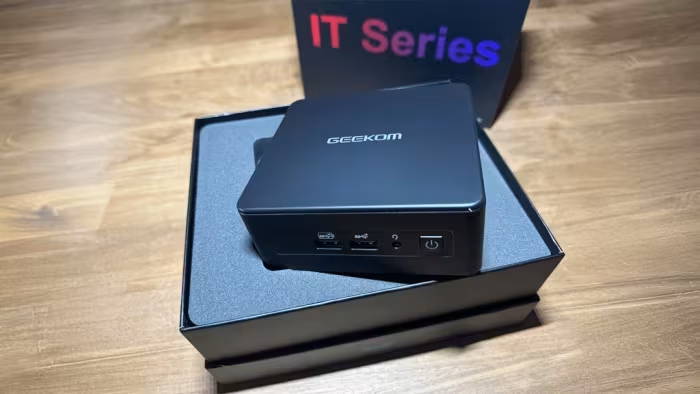
Geekom IT15
A compact, high-performance mini PC featuring the Intel Core Ultra 9 285H, designed for productivity and creative workflows.
How This Score Is Calculated
- Sources analysed: 17 reviews
- Raw weighted average: 7.4
- Formula: Σ(score × weight) ÷ Σ(weight)
- Review period: 2024–2025
- Value sources: 8 of 17 mentioned price or value
- Final score: 7.4/10 (clamped, rounded to 1 decimal)
Algorithmically calculated from source data. No manual adjustments.
- Most reviewed featurePerformance (17/17)
- Most praisedConnectivity & Port Selection
- Most criticisedFan Noise & Cooling
- Reviewer consensus levelModerate
- Value for moneyGood Value (7.2/10)
The Geekom IT15 is a potent, compact workstation that leverages the Intel Core Ultra 9 285H to deliver stellar multi-core performance for productivity and light creative tasks. While reviewers praise its robust connectivity, ease of upgrades, and premium build, it is hindered by aggressive fan noise under load and conservative power limits that prevent it from reaching peak potential. It serves as a strong, space-saving Windows alternative for professionals, though power users may find the cooling and lack of OCuLink limiting.
🔧 Key Specifications
- Processor: Intel Core Ultra 9 285H
- RAM: Up to 64GB DDR5 (User-replaceable)
- Storage: 2TB NVMe PCIe 4.0 SSD
- Display: Supports up to 4x 4K monitors
- Battery: N/A
- Connectivity: Wi-Fi 7, Bluetooth 5.4, 2.5G LAN
- Ports: USB4, HDMI, SD Card Slot
- OS: Windows 11 Pro
- Warranty: 3 Years
💲 Price Range
$899 – $1,499 (Approx. ₹75,000 – ₹95,000)
Prices sourced from reviews. Check current retailer pricing.
📊 What Reviewers Say — Feature by Feature
7 features evaluated across 17 sources.
👍 Key Strengths
- Stellar multi-core CPU performance
- Excellent connectivity (Wi-Fi 7, USB4)
- Compact, sturdy, premium build
- User-replaceable RAM and SSD
- Generous 3-year warranty
👎 Key Weaknesses
- Audible fan noise under load
- Limited peak performance due to throttling
- No OCuLink for external GPUs
- Fingerprint-prone finish
- No dedicated DisplayPort
💰 Value for Money Analysis
Reviewers generally view the IT15 as a competitive, premium-feeling workstation. While it sits at a higher price point than some mid-range alternatives, the included 2TB SSD and 32GB RAM package provides strong day-one value.
8 of 17 sources commented on price or value.
⚡ Where Reviewers Disagreed
The following areas saw meaningful disagreement across sources.
- Overall Recommendation: 11 sources praise it as a top-tier choice, while 3 sources advise caution due to cooling and design limitations. The disagreement stems from whether one prioritizes pure CPU power or refined thermal/feature management.
🎯 Who This Product Is For
Reviewer recommendations for different target audiences and use cases.
🛠️ Best Use Cases
- Office ProductivityExcellent speed in Microsoft Office and web browsing workflows.Great
- Esports GamingSmooth frame rates at 1080p medium settings for titles like Dota 2 and CS2.Good
- Light CAD/ModelingCapable performance for educational or hobbyist real-time 3D tasks.OK
🔀 Alternatives Mentioned by Reviewers
Reviewers compared the IT15 against several competitors, noting different trade-offs in power and I/O.
- GMKtec EVO-X1 — Frequently cited as a superior alternative for power users, as it utilizes the Ryzen AI 9 HX 370 processor and experiences less thermal throttling.
- Beelink GTi13 Ultra — Generally outperformed by the IT15 in synthetic and gaming benchmarks, making the IT15 the better choice for raw power.
- GEEKOM A9 Max — Offers more raw performance and I/O than the IT15, though it is larger and louder; recommended for those prioritizing performance over compactness.
- MINISFORUM M1 Pro — Described as a middle-ground alternative that matches the IT15's Intel platform benefits but with different thermal characteristics.
- Mac mini — A direct competitor in form factor; the IT15 is recommended for Windows users who need better CPU benchmarks and display connectivity, though it lacks Apple's build aesthetics.
Alternatives sourced exclusively from reviewer mentions.
🛒 Buyer's Guide
✅ Buy This If…
- You need a compact, high-performance workstation for productivity tasks.
- You prioritize connectivity like Wi-Fi 7 and multi-monitor support.
- You want a system that is easy to upgrade with RAM and SSDs.
- You prefer a Windows-based alternative to the Mac mini.
❌ Skip This If…
- You are a hardcore gamer requiring dedicated graphics card performance.
- Fan noise under heavy load is a dealbreaker for your workspace.
- You require advanced connectivity like OCuLink for external GPUs.
- You are seeking the absolute best thermal efficiency on the market.
⚠️ Things to Check Before Buying
- Verify that your specific workflow doesn't require a dedicated DisplayPort, as the unit relies on HDMI/USB4.
- Be aware that the matte surface is prone to fingerprints.
- Check if your workload is better served by a Ryzen-based system if peak performance and minimal throttling are top priorities.
📈 Sentiment Trends Over Time
Reviews from 2024 to early 2025 show a stable, if slightly polarized, reception.
- Performance Perception — While initial excitement about the Core Ultra 9 was high, later reviews became more critical of the thermal throttling and cooling limitations.
The Geekom IT15 is a powerful, well-connected mini PC that excels at professional productivity, making it a compelling Windows alternative to the Mac mini. Its standout feature is the raw CPU power of the Intel Core Ultra 9, paired with excellent port selection and easy upgradability. However, users should be prepared for audible fan noise and potential thermal throttling during intense workloads. If you need a compact workstation for office or creative tasks, it is an excellent choice, but power users might prefer the performance-focused Ryzen alternatives.
Top Alternative: GMKtec EVO-X1 — Choose this instead if you require more consistent peak performance and less thermal throttling for demanding tasks.
PLG_CONTENT_IMAGEGALLERY_ERROR_NO_IMAGES