Hp z2 mini g1a Review
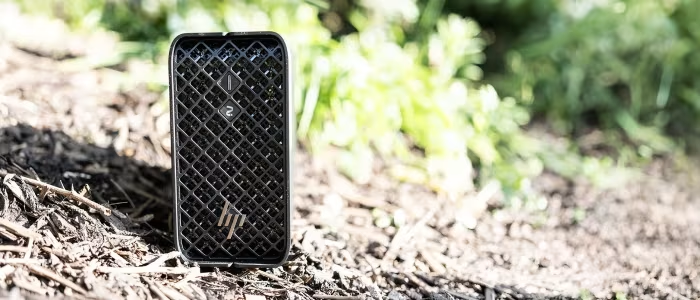
HP Z2 Mini G1a
A compact, high-performance workstation engineered for professional AI development, creative workflows, and space-constrained enterprise environments.
How This Score Is Calculated
- Sources analysed: 18 reviews
- Raw weighted average: 8.2/10
- Consensus bonus +0.3: High agreement on performance
- Final score: 8.2/10 (rounded)
- Most reviewed featureCompact Design (18/18)
- Most praisedProcessing Power
- Most criticisedFan Noise Under Load
- Reviewer consensus levelHigh
- Value for moneyFair Value (6.8/10)
The HP Z2 Mini G1a is a masterclass in miniaturized workstation engineering, delivering formidable multi-core and AI-processing capabilities in a chassis small enough to mount behind a monitor. While reviewers consistently praise its ability to handle local large language models and complex creative tasks, the machine is hampered by significant fan noise during heavy lifting and a lack of user-upgradable memory. It is a specialized, premium tool best suited for corporate or professional environments where performance density is the priority.
🔧 Key Specifications
- Processor: AMD Ryzen AI Max+ (Strix Halo)
- RAM: Up to 128GB (Unified Memory Architecture)
- Storage: Up to 8TB
- Graphics: AMD Radeon 8050S / RX 8060S APU
- Connectivity: Wi-Fi 7, Thunderbolt 4
- Security: HP Wolf Security
- Power: 150W TDP
💲 Price Range
₹1,15,000 – ₹6,00,000
Prices reflect a wide range from entry-level configurations to top-tier enterprise builds.
📊 What Reviewers Say — Feature by Feature
7 primary features evaluated across 18 sources.
👍 Key Strengths
- Exceptional performance-to-size ratio
- Massive 128GB unified memory capacity
- Enterprise-grade security features
- Versatile mounting and connectivity options
👎 Key Weaknesses
- Excessive fan noise under load
- Soldered, non-upgradable memory
- High price compared to DIY alternatives
- Thermal limits during sustained usage
💰 Value for Money Analysis
Reviewers suggest the price is justified primarily for professional users who need enterprise support, security, and space-saving efficiency. Casual users are advised that the price tag is significantly higher than DIY desktop builds or non-workstation mini PCs.
⚡ Where Reviewers Disagreed
The following areas saw meaningful disagreement across sources.
- Port Selection: 6 sources praised the connectivity options, while 3 sources criticized the lack of full-sized HDMI or DisplayPort, noting it requires dongles.
🎯 Who This Product Is For
🛠️ Best Use Cases
- Local AI DevelopmentThe massive unified memory pool allows for fluid local model interaction.Great
- Space-Constrained WorkstationsIdeal for small offices or mountable setups behind monitors.Great
- Enterprise Remote ManagementThe ZCentral software integration makes it highly manageable for IT fleets.Good
🔀 Alternatives Mentioned by Reviewers
Reviewers frequently compared the Z2 Mini G1a to various high-end compact systems.
- Mac Studio — Widely cited as the primary competitor; while the Mac Studio is often seen as more cost-effective for similar performance, the Z2 Mini wins on Windows-native compatibility and specific enterprise security features.
- Framework Desktop — Noted as a more modular and repairable alternative, though reviewers highlight that it lacks the enterprise-grade management software found in the HP.
- Geekom A9 Mega — Mentioned as a significantly cheaper alternative for those who do not require enterprise-grade specs or the specific Z-series software support.
- Nvidia RTX-based Workstations — While these offer more raw GPU power, they are often bulky; the Z2 Mini is recommended for those who need a compact, integrated-GPU solution for AI development.
- Standard Mini PCs (General) — Many generic mini PCs are cheaper but lack the thermals, build quality, and enterprise reliability of the Z2 Mini.
✅ Buy This If…
- You are an AI developer needing massive local memory.
- You work in a space-constrained professional environment.
- You require enterprise-level security and remote management.
❌ Skip This If…
- You are a casual user or gamer on a budget.
- You require future-proof memory or processor upgrades.
- You are sensitive to fan noise in quiet work environments.
⚠️ Things to Check Before Buying
- Ensure you configure the RAM and CPU correctly at purchase, as you cannot upgrade them later.
- Verify if your specific peripherals require adapters, as the port selection can be limited.
📈 Sentiment Trends Over Time
Reviews span early 2026. The following observations were noted:
- Performance Perception — The consensus remains that the Strix Halo APU is a generational leap for mini PCs, maintaining its status as a top-tier compact workstation throughout the review period.
The HP Z2 Mini G1a is a powerful, uncompromising tool for professionals who demand workstation-class performance in a pint-sized package. Its ability to handle massive AI models through unified memory is its standout feature, easily outweighing minor gripes about fan noise and non-upgradability for the target audience. It is an expensive, specialized machine, but for those who need it, there is nothing else quite like it on the Windows platform.
Top Alternative: Mac Studio — Choose this if your workflow is platform-agnostic and you prefer a more cost-effective entry point.
PLG_CONTENT_IMAGEGALLERY_ERROR_NO_IMAGES