PlayStation Portal Review
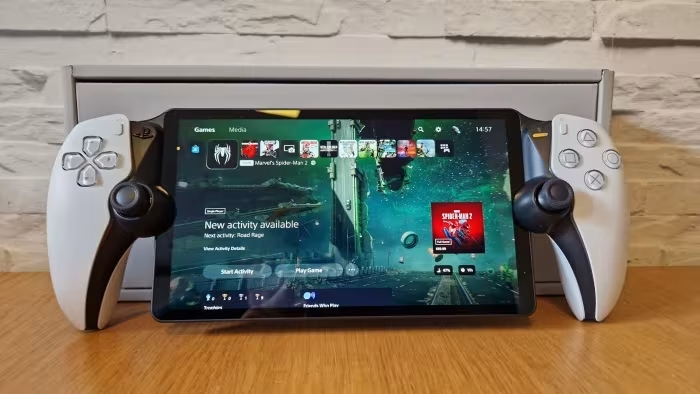
PlayStation Portal
A dedicated remote-play handheld peripheral by Sony designed to stream PlayStation 5 games via Wi-Fi.
How This Score Is Calculated
- Sources analysed: 27 reviews
- Raw weighted average: 6.8/10
- Formula: Σ(score × weight) ÷ Σ(weight)
- Review period: 2023–2026
- Final score: 6.8/10 (clamped, rounded to 1 decimal)
- Most reviewed featureDualSense Ergonomics (27/27)
- Most praisedController Integration
- Most criticisedNo Bluetooth Audio
- Reviewer consensus levelModerate
The PlayStation Portal is a dedicated remote-play device that successfully translates the premium ergonomics of the DualSense controller into a portable form factor. It excels at its primary mission of allowing PS5 gaming away from the main television, provided the user has a robust home network. However, its lack of Bluetooth audio, absence of native media apps, and total reliance on a stable internet connection keep it firmly in the 'niche accessory' category rather than a standalone handheld.
🔧 Key Specifications
- Display: 8-inch LCD, 1080p, 60fps
- Controller: Integrated DualSense with haptics/adaptive triggers
- Connectivity: Wi-Fi (Wi-Fi 5)
- Audio: Headphone jack (No Bluetooth)
- Battery: Approx. 3–5 hours
- Charging: USB-C
- Compatibility: PS5 console required
💲 Price Range
Approx. ₹15,000 – ₹25,000
Prices fluctuate based on region and retailer.
📊 What Reviewers Say — Feature by Feature
Key features evaluated across 27 sources.
👍 Key Strengths
- Excellent DualSense controller integration
- Comfortable, ergonomic handheld design
- High-quality 8-inch 1080p display
- Simple and intuitive setup
👎 Key Weaknesses
- No native Bluetooth headphone support
- Dependent on stable Wi-Fi
- Limited functionality (no media apps)
- Not a standalone gaming console
💰 Value for Money Analysis
Reviewers are divided; many feel the price is high for a 'one-trick pony' that provides no functionality over a smartphone with a controller mount. However, those who value the dedicated, integrated hardware find the convenience worth the investment.
18 of 27 sources commented on price or value.
⚡ Where Reviewers Disagreed
The following areas saw meaningful disagreement across sources.
- Value Proposition: 10 sources call it 'overpriced' or 'unnecessary,' while 8 sources argue it is a 'worthwhile investment' for the comfort it provides.
🎯 Who This Product Is For
🛠️ Best Use Cases
- Home Remote Play Ideal for playing games in another room, provided there is a strong Wi-Fi signal. Great
- Competitive Gaming Generally discouraged due to input latency inherent in streaming, which can exceed 100ms. Poor
🔀 Alternatives Mentioned by Reviewers
- Smartphone + Backbone/Razer Kishi: The most frequently cited alternative. Reviewers note it is cheaper and more versatile, as it uses the same Remote Play app but offers a phone's internal functionality.
- Nintendo Switch / Steam Deck: Frequently compared as 'true' standalone handhelds. While these run games natively, they cannot stream PS5 games with the same integrated DualSense experience.
- Laptop/Tablet with Remote Play: A common alternative for those who prefer larger screens, though they lack the ergonomic 'all-in-one' feel of the Portal.
🛒 Buyer's Guide
✅ Buy This If…
- You own a PS5 and want a dedicated device for playing games in different rooms.
- You prioritize ergonomics and the specific feel of the DualSense controller.
❌ Skip This If…
- You are looking for a standalone handheld gaming console.
- You have poor or unstable home Wi-Fi.
⚠️ Things to Check Before Buying
- Ensure your home Wi-Fi is robust; performance is entirely dependent on network stability.
- Check if you are comfortable using wired headphones, as there is no Bluetooth support.
📈 Sentiment Trends Over Time
Reviews span 2023 to 2026. Initially, reviewers were skeptical of the price-to-utility ratio, but long-term sentiment improved as users recognized the convenience of the dedicated form factor for home gaming.
The PlayStation Portal is a polished, highly specific accessory that nails the ergonomics of the DualSense controller in a handheld form. While it is certainly not for everyone—especially those seeking a versatile standalone console—it succeeds as a convenient extension for PS5 owners in shared households. If you have a solid home network and prioritize comfort over versatility, it is an excellent addition to your setup. Otherwise, consider a mobile-based setup first.
Top Alternative: Backbone One — Offers the same Remote Play functionality for your existing smartphone at a lower cost.